# Understanding robotics datasets: inside LeRobot, RLDS and MCAP
> Open the files, follow one recorded step, and see how observations, actions and metadata fit together in LeRobot 3, RLDS and MCAP.
- Category: Engineering
- Published: 2026-10-26
- Authors: Om Gate
- Canonical: https://videodb.io/blog/understanding-robotics-datasets
- HTML: https://videodb.io/blog/understanding-robotics-datasets · Markdown: https://videodb.io/blog/understanding-robotics-datasets.md
- Tags: robotics, datasets, lerobot, rlds, mcap, physical ai
---
When you open a robotics dataset, the first thing you see might be a folder of videos, a few Parquet files, or hundreds of TFRecord shards. Somewhere in those files are the camera frames the robot received, the commands recorded alongside them, and the metadata connecting the two.
Let's open a few and follow those connections. We will start with LeRobot 3, then look at RLDS and MCAP. For each, the questions are the same: what is stored here, how do we read one moment, and what do we need to know to interpret it?
By the end, you should know where observations and actions live, how to inspect an episode, and what a recording still needs before it can become training data.
## TL;DR
- **LeRobot 3** connects rows in Parquet files to camera frames in videos. Episode metadata tells us which rows and video segments belong together.
- **RLDS** organizes interactions into episodes containing steps. Its boundary flags tell us how to interpret the final observation. Many datasets store these episodes in TFRecord files.
- **MCAP** stores timestamped messages on channels. It does not prescribe episodes, actions, or success labels; those meanings come from the project that produced the recording.
## In this article
1. [What are we looking for in a dataset?](#what-are-we-looking-for-in-a-dataset)
2. [How do the formats organize recorded steps?](#how-do-the-formats-organize-recorded-steps)
3. [Inside LeRobot 3](#inside-lerobot-3)
4. [Inside RLDS](#inside-rlds)
5. [Inside MCAP](#inside-mcap)
6. [Start with one episode](#start-with-one-episode)
## What are we looking for in a dataset?
A robot's **policy** is the rule or model that chooses its next action from its observations. In imitation learning, a model learns from recorded examples of observations and the actions demonstrated alongside them. That is why a camera video alone usually gives us only part of the training example.
For our main example, let's use [ArmnetBench's SO-101 dataset](https://robopeek.videodb.io/open?url=https%3A%2F%2Fhuggingface.co%2Fdatasets%2Farmnet%2Farmnetbench_v01_lerobot_so101%2Ftree%2F1db69c82b589c7172ee31a6b8f7ef58d1fc2c663&episode=1), shown here in RoboPeek. One of its tasks asks the robot to insert a coloured ring onto a wooden peg. It records three cameras, measured joint positions, and commanded joint positions.
| Part of the example | What we find here |
|---|---|
| Camera observations | Front, overhead, and wrist images |
| Measured state | Six values describing the robot's joints and gripper |
| Action | Six commanded joint and gripper positions |
| Task | “Insert the colourful ring into the central wooden peg” |
| Position in the recording | Episode index, frame index, and timestamp |
| Outcome | An episode label such as `successful`, `failure`, or `suboptimal` |
[ArmnetBench episode 1 in RoboPeek](https://robopeek.videodb.io/embed?url=https%3A%2F%2Fhuggingface.co%2Fdatasets%2Farmnet%2Farmnetbench_v01_lerobot_so101%2Ftree%2F1db69c82b589c7172ee31a6b8f7ef58d1fc2c663&episode=1)
_ArmnetBench episode 1 in RoboPeek. Scrub the timeline, or open it in a full tab. The dataset itself is on Hugging Face._
We record both where the robot is and where it was commanded to move. For example, the gripper may still be open when the command tells it to close. The measured state captures the first; the action records the second.
In this dataset, each **episode** represents one recorded task attempt. Its **steps** group observations and associated actions at successive points in the interaction. **Trajectory** usually refers to the sequence of states or observations and actions through that attempt.
When a policy controls the robot, the resulting sequence is called a **rollout**. For the ring task, that sequence includes approaching the ring, attempting a grasp, and moving toward the peg. Saving the sequence with a start and an end gives us an episode, just as recording a human demonstration does. The outcome belongs to the attempt; a single frame near the ring cannot tell us whether the robot eventually succeeded.
## How do the formats organize recorded steps?
The same recorded interaction can be stored in different ways. LeRobot and RLDS organize observations and actions into episodes and steps. MCAP stores timestamped messages, leaving their grouping into episodes and steps to the project.
| Format | What it organizes | Where images live | How we locate a step |
|---|---|---|---|
| LeRobot 3 | Episode-indexed rows and associated media | Usually video files in the layout discussed here | Episode metadata, row indices, and video offsets |
| RLDS | Episodes containing steps | In a common TFDS export, encoded images inside the step records | Read an episode, then its steps |
| MCAP | Timestamped messages on channels | In message payloads, using the channel's encoding | Select channels and a time range; episode boundaries are project-defined |
Whichever format we open, the values grouped into one step were not necessarily captured at the same instant; cameras, joint sensors, and controllers report at their own rates. A recorder can write directly into LeRobot; MCAP is not a required intermediate format.
## Inside LeRobot 3
### What are the files for?
The ArmnetBench example uses LeRobot `v3.0`. Here is a shortened view of its layout; the numbered files continue beyond those shown:
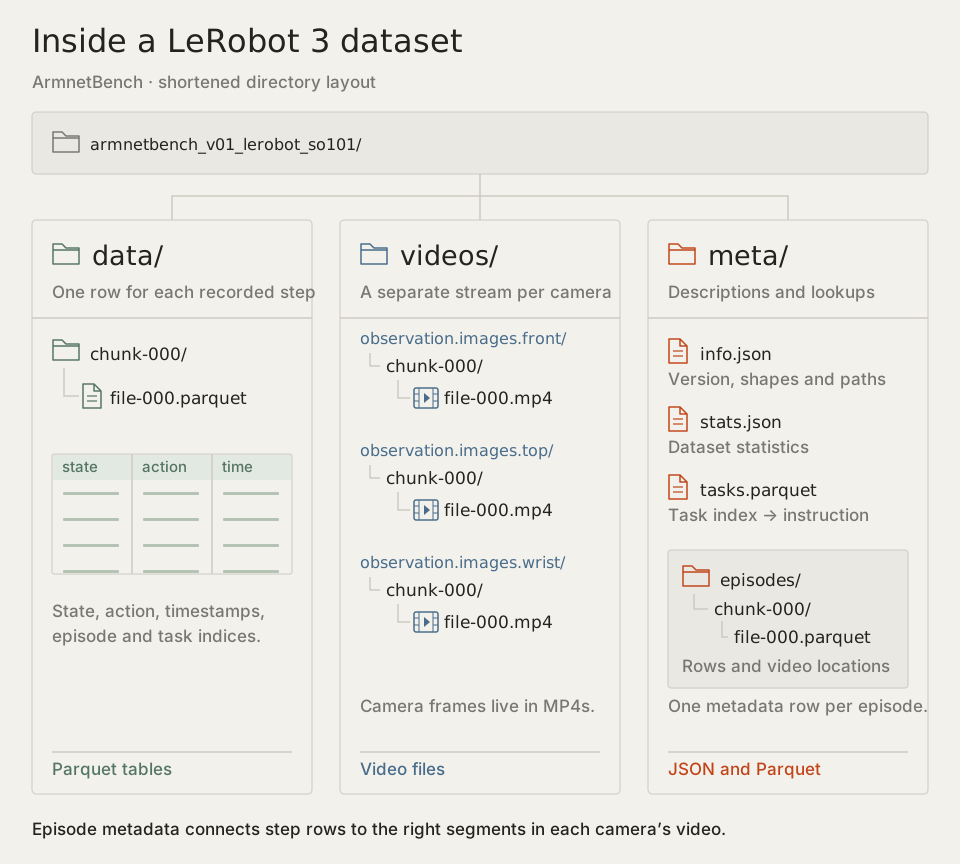
The Parquet file under `data/` contains a table. Each row describes a step: state, action, timestamp, and identifiers linking it to an episode and task. Parquet is a typed, columnar table format; these rows include scalar fields and array-valued state and action fields.
The MP4 files contain the camera images. A row's image is found through its episode and timestamp; the image pixels are not sitting inside that numerical row in this example.
There is another Parquet file under `meta/episodes/`. Its rows describe **episodes**, including where their data and videos are located. The identical file extension can hide that important difference: one table describes steps, the other describes how to find their parent episodes.
Start with `meta/info.json`. It declares the format version, frame rate, feature names, shapes, and file-path templates. In this dataset it identifies two six-value vectors, three video features, and a rate of 20 frames per second. `meta/tasks.parquet` connects task indices to instructions. `meta/stats.json` contains aggregate statistics used for operations such as normalization. The [v3 storage implementation](https://github.com/huggingface/lerobot/blob/v0.4.0/src/lerobot/datasets/utils.py) defines these paths and metadata conventions.
### Where is episode 1, step 120?
Episode 1 in our [pinned dataset snapshot](https://huggingface.co/datasets/armnet/armnetbench_v01_lerobot_so101/tree/1db69c82b589c7172ee31a6b8f7ef58d1fc2c663) contains 421 steps. Its episode metadata gives a dataset-index range from 510 up to, but excluding, 931. Its front-camera segment starts at 25.5 seconds inside `file-000.mp4`.
At frame index 120, we find:
| Field | Value | Meaning |
|---|---|---|
| `episode_index` | `1` | The recorded attempt |
| `frame_index` | `120` | Position within that attempt, counting from zero |
| `index` | `630` | Position in the whole dataset |
| `timestamp` | `6.0` | Seconds from the episode's start |
| `task_index` | `0` | Lookup key for the ring-insertion instruction |
The global index is `510 + 120 = 630`. The matching front-camera image is at `25.5 + 6.0 = 31.5` seconds in the shared video. At that moment, the gripper is down by the yellow ring.
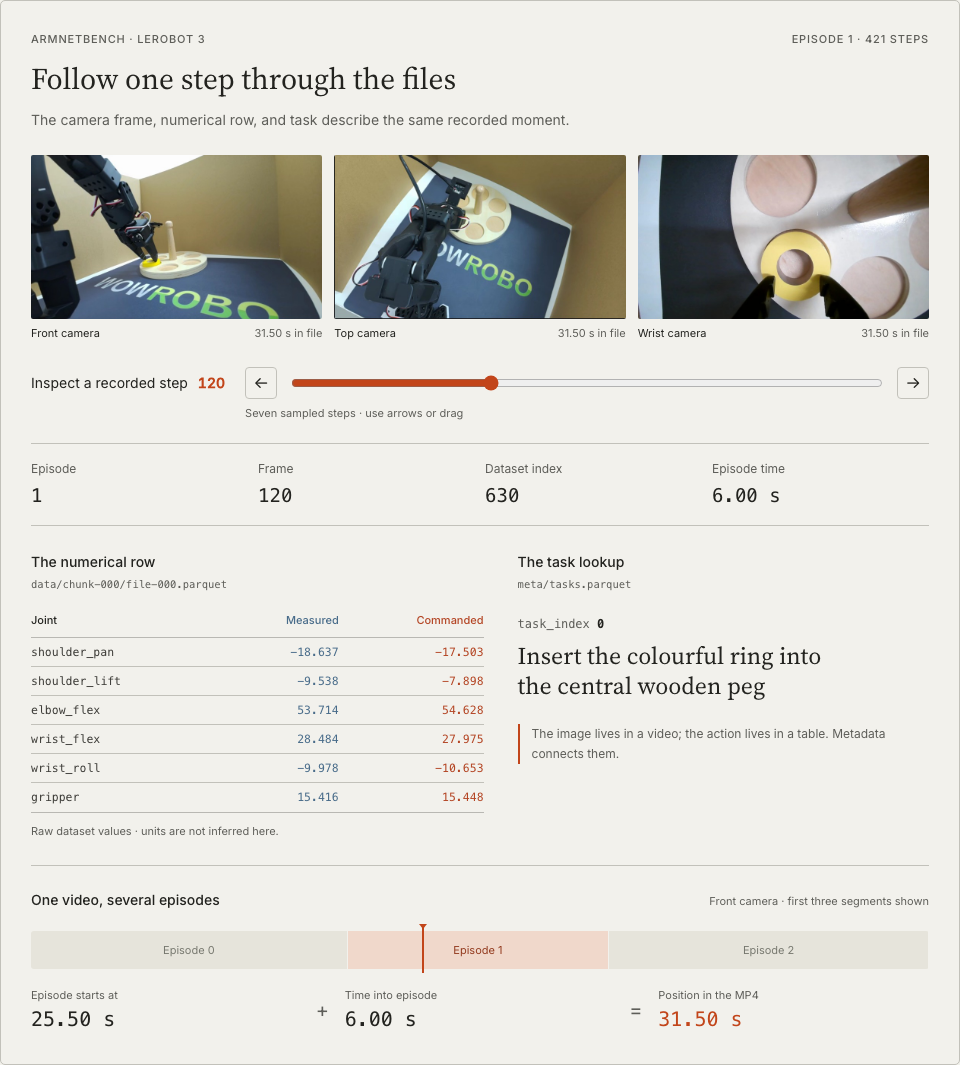
_ArmnetBench, episode 1, step 120. Values are rounded for display; the source arrays are preserved._
[Preview ArmnetBench episode 1 in RoboPeek ↗](https://robopeek.videodb.io/open?url=https%3A%2F%2Fhuggingface.co%2Fdatasets%2Farmnet%2Farmnetbench_v01_lerobot_so101%2Ftree%2F1db69c82b589c7172ee31a6b8f7ef58d1fc2c663&episode=1)
An episode doesn't necessarily correspond to a separate file. Several episodes can share the same Parquet and video files; [episode metadata](https://huggingface.co/docs/lerobot/lerobot-dataset-v3) identifies the rows and video segments belonging to each attempt.
There are two consequences worth keeping in mind. First, `chunk-000` groups files for storage; it is not an episode identifier. Second, copying or trimming an MP4 without updating its metadata can break the connection between a row and its image. Each camera has its own file and offset fields, so a loader must resolve each one separately.
### Can we read that step ourselves?
This example reads the underlying tables directly. It prints the numerical row, resolves its task, and calculates its front-video time. It does not download or decode the video. The paths and revision are pinned to the example we inspected.
```bash
python -m pip install huggingface_hub==2.3.0 pyarrow==26.0.0
```
```python
from huggingface_hub import hf_hub_download
import pyarrow.parquet as pq
REPO = "armnet/armnetbench_v01_lerobot_so101"
REV = "1db69c82b589c7172ee31a6b8f7ef58d1fc2c663"
def table(path):
local = hf_hub_download(REPO, path, repo_type="dataset", revision=REV)
return pq.read_table(local).to_pylist()
# These paths belong to the inspected snapshot; use info.json for other datasets.
episodes = table("meta/episodes/chunk-000/file-000.parquet")
episode = next(e for e in episodes if e["episode_index"] == 1)
path = (f"data/chunk-{episode['data/chunk_index']:03d}/"
f"file-{episode['data/file_index']:03d}.parquet")
step = next(r for r in table(path)
if r["episode_index"] == 1 and r["frame_index"] == 120)
task = next(t["task"] for t in table("meta/tasks.parquet")
if t["task_index"] == step["task_index"])
video_time = (episode["videos/observation.images.front/from_timestamp"]
+ step["timestamp"])
print(step)
print("task:", task)
print("front video time:", video_time) # 31.5 seconds
print("episode outcome:", episode["success_class"]) # failure
```
The output includes `index: 630`, `timestamp: 6.0`, and `front video time: 31.5`, along with the six-value `observation.state` and `action` arrays. These are the dataset's recorded values. To interpret them, check its documentation for each joint's units and the ordering of values in the state and action vectors; other datasets use different [action representations](https://huggingface.co/docs/lerobot/action_representations). A training loader such as `LeRobotDataset` performs the lookups and media decoding for us, returning the images alongside the numerical values. Looking at the tables first makes those connections easier to understand.
The outcome printed here is `failure`. It comes from ArmnetBench's episode metadata, not from step 120. This episode ends at frame 420. Its end marker is `next.done=True`, but its recorded outcome is `success_class=failure`. These are [dataset-specific fields](https://huggingface.co/datasets/armnet/armnetbench_v01_lerobot_so101#armnetbench-extensions-beyond-stock-lerobot); an end marker alone does not indicate success, and not every LeRobot dataset provides them.
### What about LeRobot 2.0 and 2.1?
The main difference is how files and statistics are organized:
| Version | File layout | Statistics |
|---|---|---|
| 2.0 | Separate data file and camera videos per episode | Dataset-wide statistics |
| 2.1 | Data files and videos are still organized by episode | The main change is statistics for individual episodes, which can be combined for a selection |
| 3.0 | Multiple episodes can share data and video files | Aggregate statistics plus per-episode statistics in episode metadata |
Check `codebase_version` in `meta/info.json` before interpreting a directory. It describes the dataset format, separately from the installed Python package version. The [migration guide](https://huggingface.co/docs/lerobot/porting_datasets_v3) explains how older episode files become shared files.
## Inside RLDS
### Is RLDS a file extension?
RLDS stands for **Reinforcement Learning Datasets**. It defines a structure for sequential interactions: an episode contains steps and can carry episode-level metadata. The steps contain observations, actions, and fields describing their boundaries. It also accommodates demonstrations; the name does not mean every dataset was generated by reinforcement learning.
You will often encounter RLDS through TensorFlow Datasets, or TFDS. These exports commonly store episodes as serialized records in **TFRecord** files. RLDS describes the interaction structure; TFRecord is the container holding the records. An arbitrary TFRecord file is not automatically an RLDS dataset.
Let's use a separate, real example: the [Furniture Bench RLDS export](https://huggingface.co/datasets/lerobot-raw/furniture_bench_dataset_raw). Here are its files and the records inside them, with the long dataset prefix shortened:
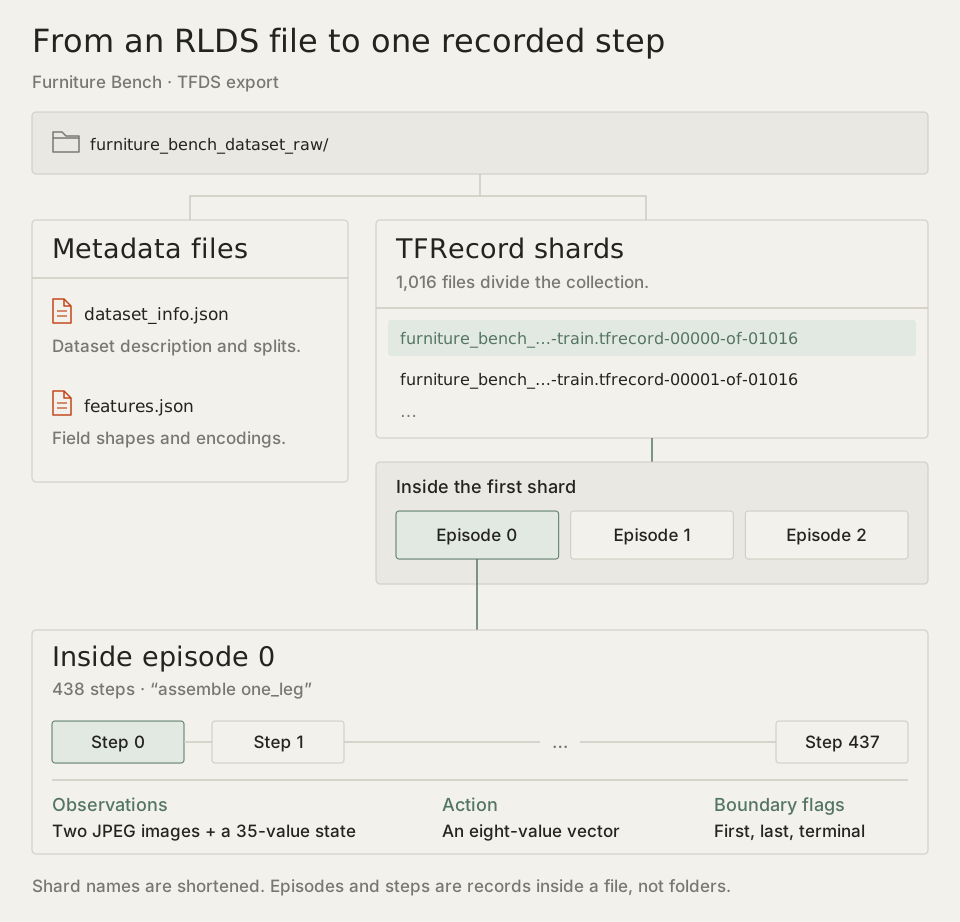
The numbered files are **shards**, which divide the collection into files. `00000-of-01016` identifies the first of 1,016 shards, not the first episode. The inspected first shard contains three episodes.
`dataset_info.json` describes the dataset and its splits. `features.json` describes how to interpret its fields, including image encodings and tensor shapes. TFDS uses these definitions to reconstruct the nested episode and step objects from the stored records.
### What is inside one episode?
The first Furniture Bench episode has 438 steps and the instruction `assemble one_leg`. Each step includes a scene image, a wrist image, a 35-value state vector, and an eight-value action vector. This is a different robot task from our ring example; its vector dimensions and meanings are different too.
In this export, the camera images are JPEG bytes in the episode's step fields. There is no shared MP4 timestamp to look up. Reading a step means decoding the image and numerical fields at the same step index.
The serialized names include `steps/action` and `steps/observation/image`. Those slashes describe nested fields, not folders on disk. The [feature definitions](https://huggingface.co/datasets/lerobot-raw/furniture_bench_dataset_raw/blob/a51b16bffc46bd340f6fa2ca80c6b86768219fc7/features.json) give each field's shape and encoding; the loader below uses them to rebuild the steps. This record has no explicit step timestamp, so step 120 alone does not tell us a time in seconds.
### What happens at the last step?
RLDS distinguishes three flags:
- `is_first` marks the initial step.
- `is_last` marks the final step of the recorded episode.
- `is_terminal` says that the observation represents a terminal environment state.
These answer different questions. A recording may end because it reached a terminal state or because it was truncated. A terminal state can represent a failure as well as a success; the flag does not replace the dataset's outcome definition.
[Preview Furniture Bench's first shard in RoboPeek ↗](https://robopeek.videodb.io/open?url=https%3A%2F%2Fhuggingface.co%2Fdatasets%2Flerobot-raw%2Ffurniture_bench_dataset_raw%2Fresolve%2Fa51b16bffc46bd340f6fa2ca80c6b86768219fc7%2Ffurniture_bench_dataset_converted_externally_to_rlds-train.tfrecord-00000-of-01016)
> The last RLDS step records the ending observation, not another action to imitate. Ignore its action, reward, and discount fields, even if they contain numbers. The episode ending does not, by itself, tell you whether the task succeeded.
Under the [RLDS conventions](https://github.com/google-research/rlds#dataset-format), an action belongs to the observation it was taken from, and the reward results from that action. The final step has no further recorded transition, so its action, reward, and discount are not meaningful transition data; the reward for the preceding action is stored with that preceding step. This rule follows `is_last=True`, whether or not `is_terminal` is also true. The inspected episode ends at step 437 with both flags set; that combination is specific to this episode.
Here is a small inspection that reads the first episode from the pinned first shard. It downloads that shard (about 63 MB) and `features.json`, lets TensorFlow Datasets rebuild the episode from the feature definitions, prints one action and the boundary flags, and saves the first scene image.
```bash
python -m pip install tensorflow==2.21.0 tensorflow-datasets==4.9.10 huggingface_hub==2.3.0
```
```python
import json
from pathlib import Path
from huggingface_hub import hf_hub_download
import tensorflow as tf
import tensorflow_datasets as tfds
REPO = "lerobot-raw/furniture_bench_dataset_raw"
REV = "a51b16bffc46bd340f6fa2ca80c6b86768219fc7"
SHARD = "furniture_bench_dataset_converted_externally_to_rlds-train.tfrecord-00000-of-01016"
def fetch(path):
return hf_hub_download(REPO, path, repo_type="dataset", revision=REV)
# features.json declares every field's shape and encoding, including the JPEG images.
features = tfds.features.FeaturesDict.from_json(json.loads(Path(fetch("features.json")).read_text()))
raw = next(iter(tf.data.TFRecordDataset(fetch(SHARD))))
episode = features.deserialize_example(raw)
steps = list(tfds.as_numpy(episode["steps"]))
first, last = steps[0], steps[-1]
print(first["language_instruction"].decode())
print("steps:", len(steps), "action shape:", first["action"].shape)
print("first action:", first["action"])
for name, step in (("first", first), ("last", last)):
print(name, {k: bool(step[k]) for k in ("is_first", "is_last", "is_terminal")})
image = first["observation"]["image"] # decoded to a 224x224x3 array by the feature definition
Path("first-camera-frame.jpg").write_bytes(tf.io.encode_jpeg(image).numpy())
```
The output reports `assemble one_leg`, 438 steps, and an action shape of `(8,)`. Step 0 has `is_first=True`; step 437 has `is_last=True` and `is_terminal=True`. The feature definitions decoded the stored JPEG bytes into an image array for us, which is why we re-encode before saving. A full TFDS loader applies the same definitions across every shard; here we applied them to one record so we can see what it reads.
## Inside MCAP
### What is a message connected to?
An MCAP file contains messages from one or more channels. Each message carries timestamps and a payload. The channel tells us its topic and message encoding, and can refer to a schema describing the payload's structure. These relationships are defined in the [MCAP specification](https://mcap.dev/spec).
The message's `channel_id` points to a channel record. From there, `schema_id` can point to a schema record. Several messages can share the same channel:
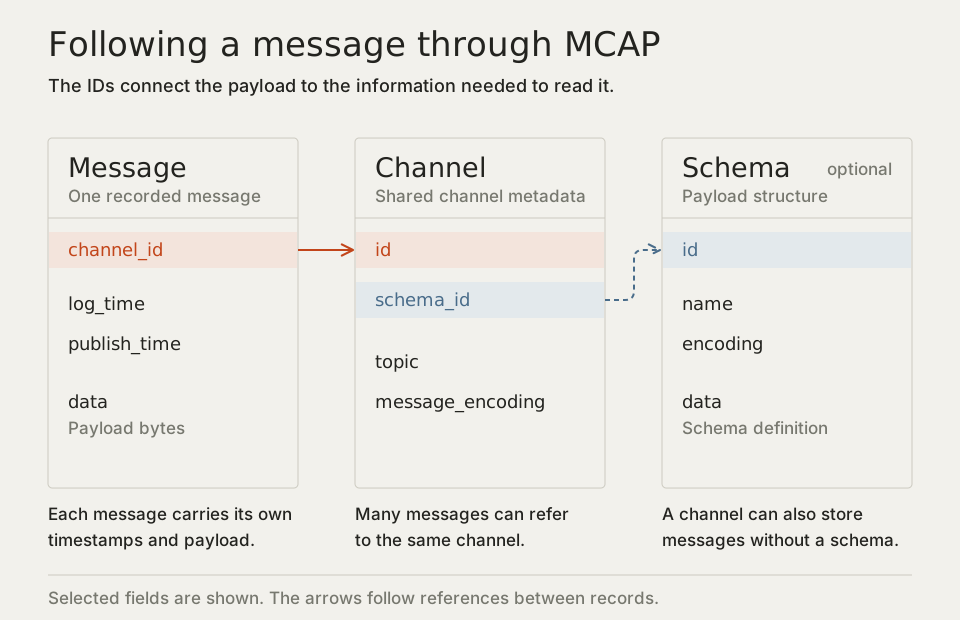
For example, a camera channel might use protobuf messages with the schema `foxglove.CompressedVideo`. Another channel might contain JSON numerical values. The reader first identifies the channel and encoding, then uses the appropriate decoder. Reading the message bytes is not the same as obtaining a decoded camera image.
The two timestamps also have distinct meanings. `log_time` is when the message was recorded; `publish_time` is when it was published. Both use nanoseconds. A payload may contain another timestamp from the sensor itself. Timestamps expressed in the same units are not necessarily synchronized; check which clock each timestamp uses before comparing streams.
Messages may be grouped into **chunks**, often for compression and indexing. A chunk boundary is a storage boundary. It says nothing by itself about where the robot finished one attempt and began another.
### What does a real recording contain?
For this example, we will open [Voxel51's MCAP conversion of NVIDIA GR00T simulated transport data](https://huggingface.co/datasets/Voxel51/GR00T-X-Embodiment-Sim). It contains three camera channels along with state, action, and other messages. This MCAP file was converted from a LeRobot dataset, so its observations and actions had already been grouped into steps before export. MCAP does not necessarily mean raw, unprocessed acquisition.
[Preview the transport recording in RoboPeek ↗](https://robopeek.videodb.io/open?url=https%3A%2F%2Fhuggingface.co%2Fdatasets%2FVoxel51%2FGR00T-X-Embodiment-Sim%2Fresolve%2Fadb9ef80f1a6eb8ce420e25dc1bafe54f1d69a19%2Fdata%2Fbimanual_panda_gripper.Transport%2Fepisode_000000%2Fepisode.fo.mcap)
The inspected file has JSON channels named `/left-arm-eef-pos-state.plot` and `/left-arm-eef-pos-action.plot`, plus a protobuf camera channel named `/front-view-camera`. Their names help us identify candidates, but we still need their definitions to interpret the numbers. In particular, the position-related action values should not be assumed to use the same representation as the measured state.
The following code downloads the recording (about 3.3 MB) and reads these three channels over the first 75 milliseconds of log time. It decodes the JSON payloads and prints the size of the encoded camera messages. The file's summary provides the starting time; summaries are optional in MCAP generally, but present in this inspected sample.
```bash
python -m pip install mcap==1.5.0
```
```python
# This inspected sample includes summary statistics; MCAP does not require them.
# The query selects a log-time window; it does not align messages or decode video.
import json
from urllib.request import urlretrieve
from mcap.reader import make_reader
url = (
"https://huggingface.co/datasets/Voxel51/GR00T-X-Embodiment-Sim/resolve/"
"adb9ef80f1a6eb8ce420e25dc1bafe54f1d69a19/"
"data/bimanual_panda_gripper.Transport/episode_000000/episode.fo.mcap"
)
urlretrieve(url, "transport.mcap")
with open("transport.mcap", "rb") as file:
reader = make_reader(file)
start = reader.get_summary().statistics.message_start_time
topics = [
"/left-arm-eef-pos-state.plot",
"/left-arm-eef-pos-action.plot",
"/front-view-camera",
]
for schema, channel, message in reader.iter_messages(
topics=topics, start_time=start, end_time=start + 75_000_000
):
payload = (
json.loads(message.data) if channel.message_encoding == "json"
else f"{len(message.data)} encoded bytes"
)
print(f"{(message.log_time - start) / 1e9:.3f}s", channel.topic, payload)
```
We get state, action, and camera messages at approximately 0.000 and 0.050 seconds. These converted streams happen to share timestamps. The camera payload still needs protobuf and video decoding; printing its byte count does not decode it.
The query selects a time window. It has not decided which observation an action belongs to, interpolated a missing joint reading, or created a dataset step. Those choices remain visible rather than being hidden inside a conversion helper.
### Where are the episodes and outcomes?
MCAP does not reserve fields for a training episode, an action vector, or a task-success label. A project can store them in its messages, metadata, or accompanying files. Some projects save one file per attempt, but we cannot assume that when opening an unfamiliar recording.
Before turning messages into learning examples, identify the commanded-action topic, choose the clock and alignment rule, mark the start and end of each attempt, and locate the task and outcome information. A joint-state topic gives us measurements; it does not establish what commands were sent.
For the same reason, converting a file cannot recover an action that was never recorded. Filling missing actions with zeros labels them as actual zero-valued commands. The file may be readable while still lacking information the intended training method needs.
## Start with one episode
Let's return to the ring task. In [ArmnetBench's episode metadata](https://huggingface.co/datasets/armnet/armnetbench_v01_lerobot_so101/tree/1db69c82b589c7172ee31a6b8f7ef58d1fc2c663/meta/episodes/chunk-000), episode 1 is labeled `failure`. Its final row, frame index 420, has `next.done=True` and `next.reward=0`. The attempt ended, but it did not meet the dataset's success criteria.
The same inspection questions apply whichever reader you use:
1. **Do the images and numerical values describe the same moment?** Check the episode boundaries and any video or timestamp offsets.
2. **What does each action value mean?** Find its units, joint ordering or coordinate frame, and any calibration needed to interpret it.
3. **How did the recording end?** Separate the end of an episode, a terminal state, and a recorded success label. If an outcome is absent, treat it as unknown.
4. **Are any readings missing or invalid?** Check for missing frames, non-finite numerical values, and unexpected timestamp gaps.
Start with the episode we explored: [open it in RoboPeek](https://robopeek.videodb.io/open?url=https%3A%2F%2Fhuggingface.co%2Fdatasets%2Farmnet%2Farmnetbench_v01_lerobot_so101%2Ftree%2F1db69c82b589c7172ee31a6b8f7ef58d1fc2c663&episode=1), follow the camera frames alongside the recorded state and actions, and check its outcome in the metadata. Compare the robot's movement in the video with the state and action plots. Then try the same inspection on your own dataset.