Can Claude and ChatGPT Watch Videos? Yes, Here's How
On their own, Claude and ChatGPT see only part of a video. Connect VideoDB and they can search the whole thing, give you timestamps and cut clips of the moments you ask for.
- On their own: Anthropic’s file-upload help page lists documents and images, not video formats. ChatGPT accepts video files, but it may not analyze the whole video or its audio.
- What VideoDB adds: the AI can index a full video or a YouTube link, search it, give timestamps and cut clips.
- Setup: in Claude, open Customize, find VideoDB in Connectors, click Connect to Claude, then sign in and Authorize. In ChatGPT, install VideoDB from the plugin directory and sign in.
- Try first: paste a YouTube link and ask, “Where does the speaker talk about pricing?”
Can ChatGPT watch videos on its own? What about Claude?
Not much, going by their own help docs. Anthropic’s file-upload page doesn’t list video formats, and OpenAI says ChatGPT can take a video file but may only look at part of it.
Claude. Anthropic’s help page on uploading files to Claude lists documents (PDF, DOCX, TXT and others) and images (JPEG, PNG, GIF, WebP). Video is not on the list. The common workaround is to upload a transcript or a few screenshots. Claude then works from those, not from the video itself.
ChatGPT. OpenAI’s image inputs FAQ says ChatGPT can accept video files as attachments, including on Free plans. It also says the analysis “can be incomplete or inaccurate” and may not cover the entire video or its audio.
Neither help center describes a way to play a YouTube video from a link you paste into a regular chat.
What changes when you connect VideoDB
VideoDB indexes the whole video, so the AI can search it, quote timestamps and cut clips. You connect it through MCP, which is simply a connector that lets the AI use VideoDB.
Once it is connected, Claude or ChatGPT can:
- Take a YouTube link or any public video URL. VideoDB adds it to your account. For files on your computer, upload them at console.videodb.io first.
- Index what is said and what is shown. A spoken-word index covers speech. A scene index samples frames and describes what is on screen.
- Read on-screen text, such as slide titles, captions and labels, using VideoDB’s analyzers, shot by shot.
- Give you timestamps for every matching moment.
- Cut a clip of a moment, or join several moments into one, and give you a link to play it.
- Reframe to vertical (9:16) and render an MP4 for social.
- Search many videos at once in a collection, grouped by video.
- Index once, ask many times. Videos and indexes stay in your account until you delete them, so follow-up questions don’t re-process the video.
You can see the same building blocks used from code in giving an agent a YouTube video it can search.
How do you connect VideoDB to Claude (and ChatGPT)?
In Claude, VideoDB is listed in the connector directory. Find it, connect it, then sign in to VideoDB. Here is each screen you will see.
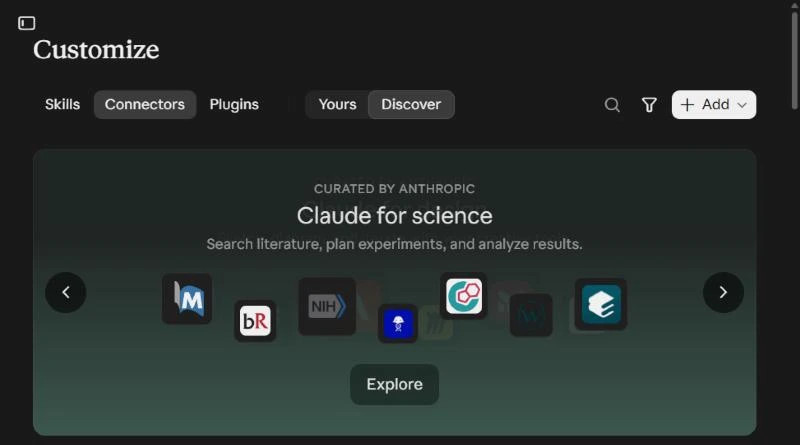
Step 1. Open Customize, then Connectors. In Claude’s sidebar, click Customize. Choose Connectors and stay on Discover.
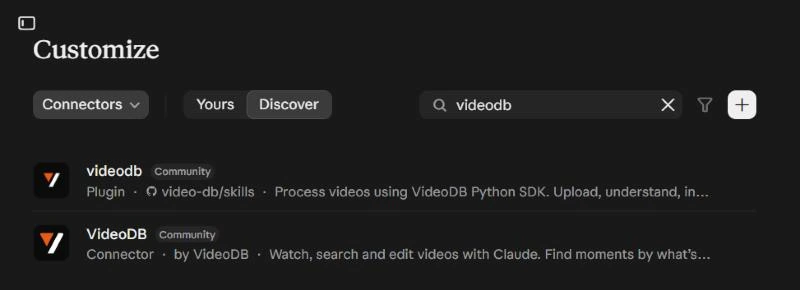
Step 2. Search for VideoDB. Click the search icon and type “videodb”. You’ll see two results. Pick VideoDB, the one labeled Connector, by VideoDB. The other one, labeled Plugin, is a separate tool that uses the VideoDB Python SDK.
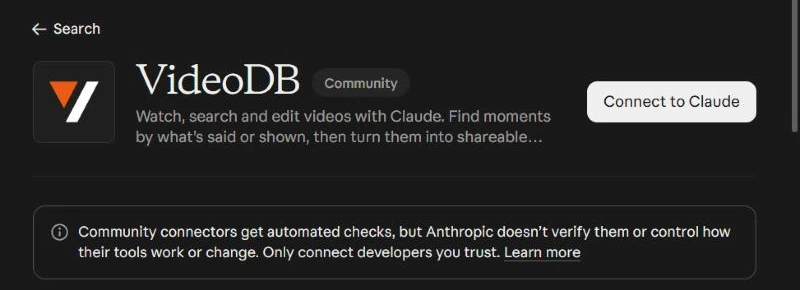
Step 3. Click Connect to Claude. The connector page opens in Claude. Claude labels it a Community connector, meaning it is built by VideoDB rather than Anthropic, and shows a short note about that. Click Connect to Claude.
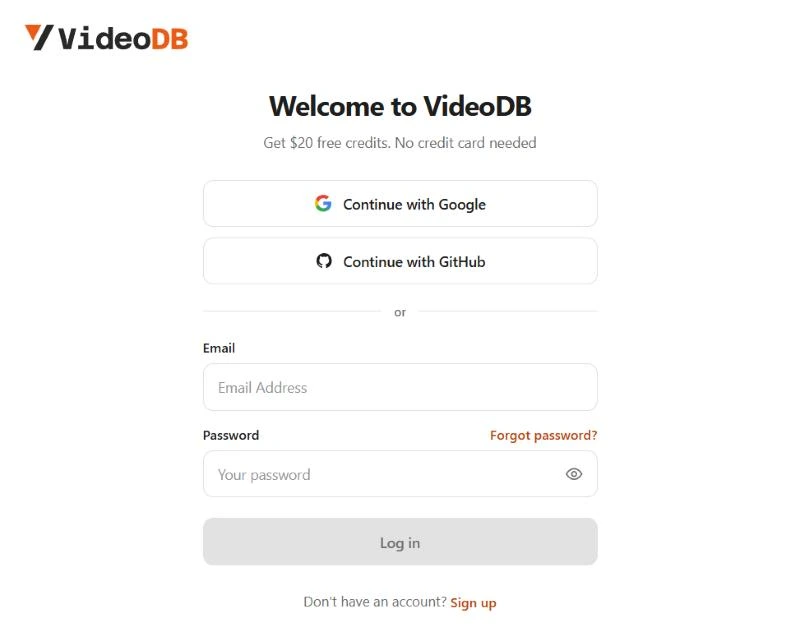
Step 4. Sign in to VideoDB. A VideoDB page opens. Sign in with Google, GitHub or email. New accounts get $20 of free credits, and no credit card is needed.
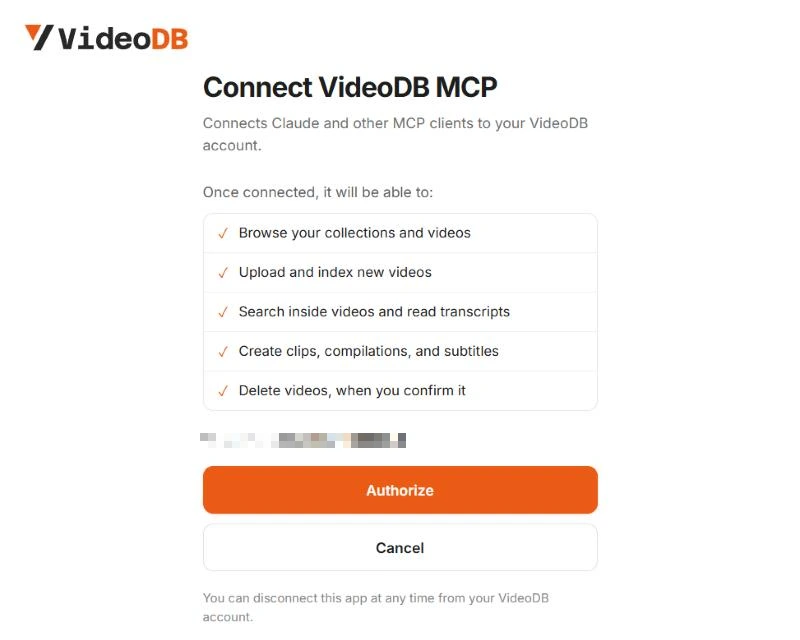
Step 5. Click Authorize. VideoDB lists what Claude will be able to do: browse your videos, upload and index new ones, search inside them, and create clips and subtitles. It deletes videos only when you confirm.
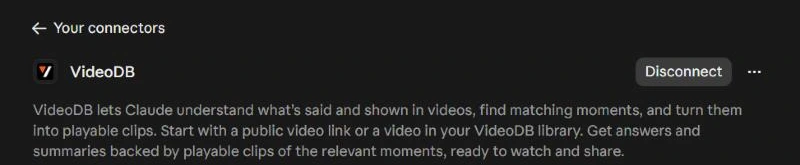
You land back in Claude with the message “Connected to VideoDB”. The connector page now shows a Disconnect button, which is also where you turn it off later.
To check it worked, ask Claude: “List my VideoDB collections.” On Team or Enterprise plans, an admin may need to add the connector for the organization first.
Can’t find it in the directory? Add it as a custom connector instead: click the + on the Connectors page, add a custom connector, paste https://mcp.videodb.io/mcp, then sign in and authorize as in steps 4 and 5 (VideoDB’s connector docs).
In Claude Code: run claude mcp add --transport http videodb https://mcp.videodb.io/mcp, then /mcp to sign in.
In ChatGPT: VideoDB is in ChatGPT’s plugin directory.
- Open VideoDB in ChatGPT and click Install plugin.
- When ChatGPT asks, connect your VideoDB account: sign in, or create a free account.
- Paste a video link and ask your first question.
If your workspace only allows its own MCP servers, an admin can add VideoDB as a custom MCP server instead (OpenAI’s guide).
5 things to ask your video (copy-paste prompts)
Paste a video link, then copy one of these. Replace the parts in brackets. The first three follow the examples VideoDB gives on its connector listing in Claude.
1. Break it down shot by shot
Upload [YouTube link] to VideoDB. Break this video down shot by shot:
what's on screen, any on-screen text, and the timestamp of each shot.
What you get: a list of shots, each with a timestamp, a short description of what is shown and any text on screen.
2. Find where they talk about something
In [YouTube link], find where they discuss [topic].
Give me the timestamps and combine those moments into one clip.
What you get: the matching moments with start and end times, plus one link that plays them back to back.
3. Transcribe it and add captions
Transcribe [YouTube link] with timestamps,
then add captions to the video and give me a link to watch it.
What you get: a timestamped transcript, and a version of the video with subtitles burned in.
4. Summarize a long video as chapters
Summarize [YouTube link] as chapters.
Give each chapter a title, a start time and two lines on what it covers.
What you get: a chapter list you can paste into a YouTube description or show notes.
5. Turn one moment into a vertical clip
In [YouTube link], find the moment where [topic] comes up.
Cut about 30 seconds around it, reframe it to vertical 9:16,
add subtitles and give me an MP4.
What you get: a vertical MP4 with subtitles, ready for Shorts, Reels or TikTok. If you already know the time range, give it instead, for example “from 2:10 to 2:40”.
Once one video works, try the habit that saves the most time: ask for any moment by describing it, and jump straight there.
Example: what the output looks like
Here is the kind of reply you get to prompt 2. This is an illustrative example, not a real transcript.
I found 3 moments where the speaker talks about pricing:

1. 04:12 to 04:58  Introduces the free plan and what it includes
2. 11:30 to 12:15  Compares monthly and yearly billing
3. 27:05 to 27:40  Answers an audience question about discounts

Here's a clip that plays all three moments back to back.
Each timestamp comes from VideoDB’s index, so you can check it against the video. Why that matters for an AI working with video is explained in why a search tool is not enough for an LLM working with video.
Claude or ChatGPT alone vs with VideoDB
On their own, the assistants work from what you give them. With VideoDB, they work from an index of the full video.
| On its own | With VideoDB | |
|---|---|---|
| Watches visuals | Claude: upload docs list images, not video. ChatGPT: video files, may not cover all of it | Scene index of the full video |
| YouTube links | No documented way to play the video | Paste the link, VideoDB adds it |
| Timestamps | Only if they are in what you uploaded | For every matching moment |
| Makes clips | No | Clips, supercuts, vertical MP4s |
| Searches many videos | No | Search a whole collection |
| Re-asks without re-uploading | Re-upload in each new chat | Indexed once, stays in your account |
Troubleshooting
Most problems are fixed by disconnecting the connector and connecting it again.
“Invalid API key” or an authorization error. The connector signs you in through your browser. No API key is needed in chat. Disconnect VideoDB in your connector settings and connect again. If that fails, sign out and back in at console.videodb.io, then reconnect. Allow pop-ups if the VideoDB page does not open.
Long videos take a moment the first time. Indexing runs once per video. While it runs, the reply may say the job is still processing. Wait a little and ask again. You don’t need to upload it again.
Tools are missing. Disconnect and reconnect so Claude loads the latest tool list.
FAQ
Can Claude watch YouTube videos?
Anthropic’s help docs don’t describe a way to. Its file-upload help page lists documents and images, and video isn’t among them. With the VideoDB connector, you paste a YouTube link and Claude can index it, answer questions about it and return timestamps and clips.
Can ChatGPT watch YouTube videos?
ChatGPT can accept uploaded video files, but OpenAI says its analysis may not cover the entire video or its audio. Install VideoDB from ChatGPT’s plugin directory and sign in, then paste a YouTube link: ChatGPT can index it, answer questions about it and return timestamps and clips.
Is VideoDB free to try?
Yes. New VideoDB accounts get $20 of free credits, and no credit card is needed. Processing videos uses those credits.
How long can the video be?
VideoDB’s connector docs don’t list a length limit. Long videos take longer to index the first time, and after that you can keep asking questions without processing them again.
Does it work in Claude Code too?
Yes. Run claude mcp add --transport http videodb https://mcp.videodb.io/mcp, then run /mcp inside Claude Code to sign in. The same tools are available there as in the Claude app.
Try it now
Add VideoDB to Claude or ChatGPT and ask your first video a question. Then ask it to find any moment.
Next, try: give an agent a YouTube video it can search, or see how Claude edited our launch video.