Frame access that keeps research moving
How robotics researchers use VideoDB to select intervals from a run, sample frames for model analysis, and inspect the surrounding sequence.
In our previous benchmark, we measured how well VideoDB finds the moment a researcher is looking for. This post is about what happens next: reaching the frames behind that result, inspecting the sequence, and using the evidence in an experiment.
The robot dropped the cup. To understand the attempt, a researcher needs the sequence around it: the approach, the grasp, and the moment the object began to move. Finding the run gives them somewhere to start. Frame access lets them examine what happened.
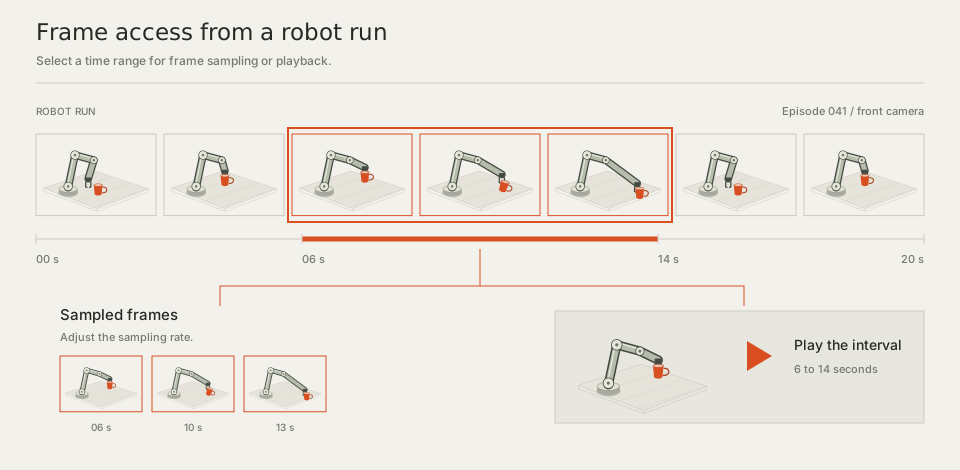
We built frame access into VideoDB so that inspection begins with a request over the recording. Researchers can select a moment or interval, sample frames for analysis, or play the selected sequence. VideoDB handles the extraction, sampling, and streaming.
Below we explain how VideoDB lets researchers choose the interval and sampling, keeps evidence connected to its source, and uses search to help them find where to begin.
One recording, accessible by frame
VideoDB prepares a recording once for frame access. Later requests address a moment or time range within it, without exporting and re-encoding a new clip for each selection.
The episode stays whole. The researcher chooses the part to inspect and how to use it: sampled frames for analysis or a stream for playback. Both come from the same recording, so review and model analysis share a source.
This gives the lab a common way to reach the visual record. An annotation task may need a few frames around a transition; a behavior review may need the sequence leading into it. Each request selects the material needed for that task, with the full run still available for follow-up.
These documentation examples use separate timestamps to demonstrate a single thumbnail and a stream assembled from two intervals. Here are those calls with their shared setup:
import videodb

conn = videodb.connect(api_key="your_api_key")
coll = conn.get_collection()
video = coll.get_videos()[0]

thumbnail = video.generate_thumbnail(time=5.0)
print(f"Thumbnail URL: {thumbnail.url}")

timeline = [(0, 30), (60, 90)]
custom_stream_url = video.generate_stream(timeline=timeline)
print(f"Custom stream: {custom_stream_url}")
These calls come from the thumbnail and custom-stream examples. Replace the API key. This example uses the first video in your default collection, which must be at least 90 seconds long for the documented timestamps. The first call returns a thumbnail image; the second returns a stream URL.
Choose the window and frame sampling
Interval length and sampling density answer different needs. A longer window preserves the sequence around an event. More closely spaced samples provide additional observations within that window.
The boundaries used for indexing are a starting point for inspection. Researchers can select surrounding source frames, extending the view before or after the returned action. This lets the inspection include the setup, the outcome, or another part of the run relevant to the question.
The two controls can be adjusted separately. To inspect the changing grasp, a researcher can hold the interval fixed and increase sampling density. They can then widen the window at the same sampling rate to review the surrounding motion. Each change has a clear purpose: inspect the transition more closely or include more context.
Review frames with people and models
A researcher can watch the interval, send selected frames to a compatible model, and review the model’s observation against the recording. VideoDB supplies access to the visual material; the researcher chooses the model and the task.
For annotation review, a researcher can read a label alongside the sequence that supports it and inspect its start and end before accepting it. For a model comparison, they can give compatible models the same selected frames and examine how their observations differ. The visual input can stay fixed while the analysis changes.
An agent workflow can use the same access during an investigation. It can retrieve a candidate interval, inspect selected frames, and request surrounding context as needed. The researcher can review the source evidence behind the resulting observation.
For robotics recordings connected with episode and camera metadata, VideoDB links results back to the episode, timestamp, and camera. These fields identify which attempt and viewpoint an observation came from, making a selected interval easier to revisit during a dataset review.
Where robot state and control records share an aligned timeline, source timestamps provide a reference for reviewing those measurements alongside the video. The frames show the visible sequence, with the related records available to inform the researcher’s analysis.
Those coordinates also make an observation easier to discuss across the team. Recording the episode, camera, and time range with a finding gives a colleague a specific place to check. They can inspect the named interval and follow the same sequence before deciding how to use the observation.
What it takes to reach a frame
A researcher asks for the frames around an action. In compressed video, reaching an exact frame can require decoding from an earlier point. Rendering a separate clip for every candidate repeats that work, including for results the researcher may never inspect.
VideoDB prepares the recording once and serves selections from it. The streaming engine handles the boundaries and, when intervals come from different runs, their order, timing, and audio where present. The researcher can select the sequence to review and return to the same run for a closer look.
From selection to a playable stream
Once a researcher selects an interval, VideoDB generates a stream they can inspect. That interval may cover a few seconds of one run or bring together moments from several recordings.
We measured how long this generation step took for streams from one source and from five sources. For requested durations from five seconds to ten minutes, every measured median stayed below one second.
| Stream duration | One source | Five sources |
|---|---|---|
| 5 seconds | 441 ms | 469 ms |
| 10 seconds | 433 ms | 433 ms |
| 30 seconds | 443 ms | 495 ms |
| 1 minute | 434 ms | 447 ms |
| 2 minutes | 521 ms | 595 ms |
| 5 minutes | 588 ms | 600 ms |
| 10 minutes | 728 ms | 994 ms |
Medians measured at the client, from the same region. Requests from another region may add about 100 to 200 ms. The measurement covers stream generation. Search, frame extraction, player startup, and model analysis have their own timings.
Moving from five seconds to ten minutes made the requested stream 120 times longer. Median generation time grew about 1.65 times for one source and 2.12 times for five. In these measurements, researchers could request substantially more context with a much smaller increase in the wait for the stream.
The cost of frame access
For playback, the work follows the selection. More intervals add joins to assemble, while longer viewing and higher bitrate mean more media delivered. A ten-minute sequence drawn from five runs still contains ten minutes of playback. More source hours also add preparation and storage, which later inspections can reuse.
For model analysis, the researcher chooses how many frames to inspect. A longer interval or denser sampling supplies more frames for the model to read. A broad sample can support the first review, followed by a closer sample where the action needs attention. The workload depends on those choices and the model used.
Across a lab, simultaneous inspections add demand for serving capacity. The latency table measures one stream assembled from one or five sources; serving several researchers and agents at once is a separate workload. A team extending access can measure its expected requests against that baseline and size the service for them. Actual cost depends on the deployment and usage.
Finding the frames to inspect
Across an archive, search helps researchers locate an interval to begin with. Our earlier retrieval benchmark tested this step using action descriptions to find timestamped moments in human egocentric video.
The 100-hour benchmark covered 2,835 videos and 11,369 text queries. VideoDB Action Segmentation + Search reached 40.39% Hit@10, ahead of AWS Nova at 35.40% and Twelve Labs Marengo 3.5 at 32.87%.
At top ten, VideoDB also leads when results must match the action’s interval more closely. Temporal intersection over union, or tIoU, measures shared time divided by the total time covered by either interval. At tIoU of at least 0.5, the corresponding scores are 20.49%, 10.01%, and 9.61%.
At the stricter tIoU ≥ 0.75 threshold, VideoDB reaches 12.83%, compared with 3.04% for AWS Nova and 3.37% for Twelve Labs. That is roughly four times either comparison pipeline at top ten, where results must agree more closely with the action’s boundaries.
Finding a moment and matching its interval
Percentage of queries with a qualifying result among the first ten, in the correct source video. Hit@10 requires overlap of at least 0.5 seconds or half the reference duration, whichever is smaller. The tIoU measures require the selected temporal match. Higher is better.
We have published the implementations for VideoDB, AWS Nova, and Twelve Labs in our robotics retrieval benchmark repository, alongside the local-model pipelines. Use the code and setup guides to run the comparisons with the required data and provider access, inspect the scoring, and check the differences yourself.
Search identifies an interval to begin with. Frame access lets the researcher inspect that interval, include the surrounding sequence, and choose the frames needed for analysis.
Action intervals improve local retrieval
We also tested five local embedding models with fixed four-second segments and VideoDB action segments, both sampled at 2 FPS. The comparison used the same corpus, queries, and reference intervals, with each model computing its own visual embeddings.
At top ten and tIoU ≥ 0.5, VideoDB action segments improved retrieval by 1.71 to 3.57× across all five encoders, with most gains close to a doubling. Improvements also held at the stricter 0.75 threshold. The comparison shows how the choice of action interval contributes alongside the embedding model.
Same encoder, different temporal units
| Encoder | Four-second windows | VideoDB action intervals |
|---|
Fixed four-second segments versus VideoDB action segments, both sampled at 2 FPS.
The next research decision
For the transfer, the next step may be to compare a successful grasp, review the action annotation, or select the interval for a dataset review. The researcher makes that decision from evidence they have inspected.
VideoDB keeps the recording accessible as that work continues. The next step begins with evidence the researcher can watch, inspect by frame, and trace back to the run.
Try the retrieval comparison on GitHub. Follow the setup guide to prepare the inputs, run the VideoDB, AWS Nova, or Twelve Labs pipeline, and inspect the intervals each returns.