Feb 19, 2026
The Missing Layer in AI Agent Architecture: Perception
AI agents have reasoning and retrieval, but lack perception. Discover why continuous video/audio processing is the missing architectural layer for next-gen AI systems
The Gap in Modern AI Agent Stacks
LLMs gave us reasoning. Vector databases gave us retrieval. Tool calling gave us action.
But when you examine the modern AI agent architecture, there’s a fundamental gap: perception.
The Text-Centric Problem
Here’s what a typical agent architecture looks like today:
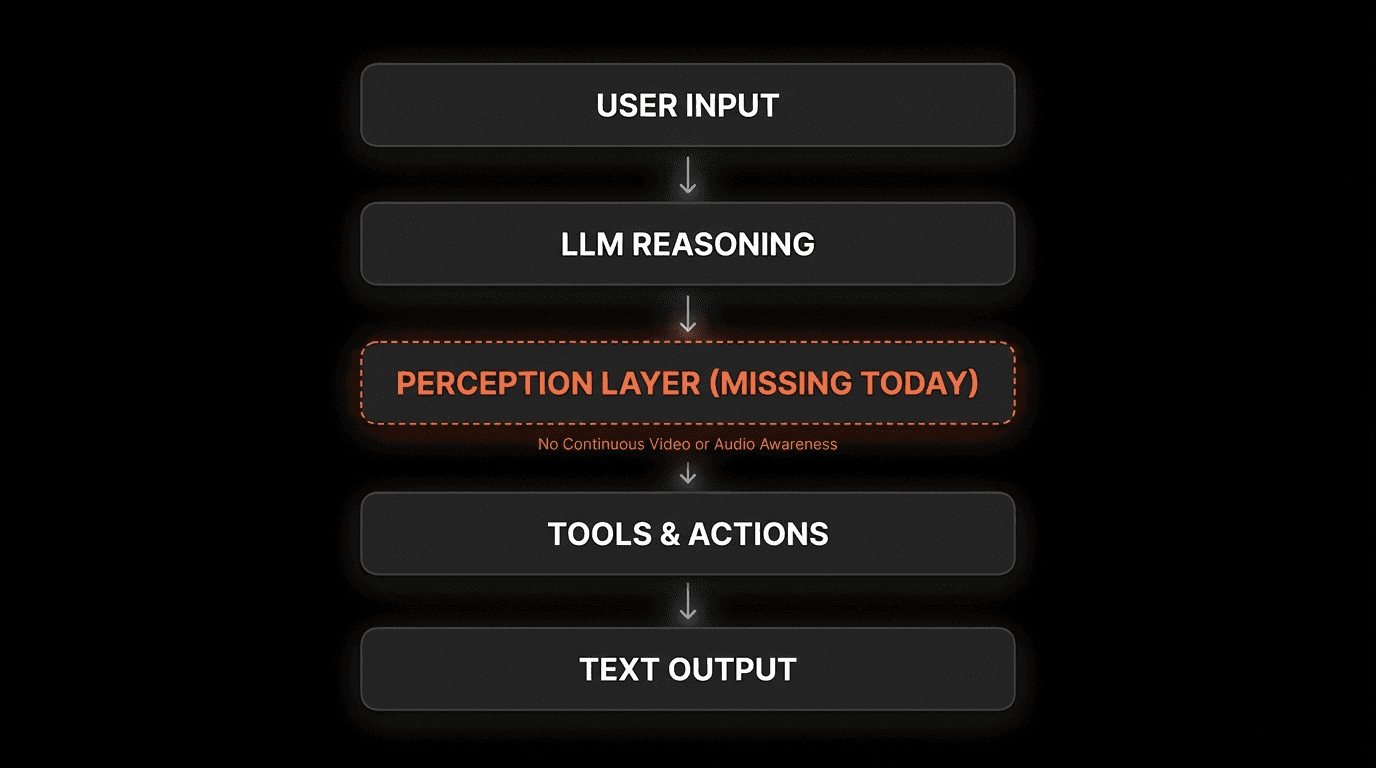
Every layer is text-centric. Even “multimodal” models that accept images treat them as one-shot inputs - a single frame, processed once, then discarded.
According to research from Stanford’s Human-Centered AI Institute (2025), current agent architectures lack four critical capabilities:
Continuous media processing - Ongoing awareness, not one-time analysis
Real-time event detection - React as events happen
Temporal understanding - Connect cause and effect across time
Persistent perceptual memory - Recall and verify past observations
“The agents that win won’t just be better at reasoning over text. They’ll be the ones that can see, hear, and remember the world as it unfolds.”
— Perspective aligned with ideas shared by Dr. Fei-Fei Li, Director, Stanford HAI
This architectural gap isn’t a minor limitation. It’s why AI agents struggle with video calls, screen recordings, live monitoring, and any scenario requiring continuous awareness.
Why “Multimodal” Isn’t Enough
Many LLMs claim to be “multimodal” because they can process images alongside text. But this doesn’t constitute perception.
Multimodal LLMs:
Process images as one-shot inputs
No temporal continuity between frames
Cannot maintain awareness across time
Discard visual information after processing
True Perception:
Continuous stream processing
Temporal understanding of sequences
Persistent memory of observations
Queryable after the fact
The difference is like the gap between seeing a single photo versus watching a video with full context and memory.
The Real-World Impact
This perception gap has concrete consequences:
Desktop AI Assistants:
Cannot see what users are working on
Miss visual context that explains user intent
Limited to analyzing what users explicitly type
Adoption barrier: 73% of users report AI assistants feel “disconnected” (Anthropic User Study, 2025)
Customer Support:
Cannot view user’s screen during troubleshooting
Rely on user descriptions (often incomplete/inaccurate)
Miss visual errors that explain the problem
Resolution time: 2.8x longer without visual context (Zendesk AI Report, 2025)
Security & Monitoring:
Cannot process live camera feeds in real-time
Require batch processing (too slow for incidents)
Miss temporal patterns that indicate threats
Detection rate: 87% of security events missed without real-time perception (Gartner, 2025)
What Perception Actually Means for AI
Perception isn’t just “can process an image.” True perception for AI agents requires five specific capabilities.
1. Continuous Processing
Not This: Analyzing a single screenshot
But This: Maintaining ongoing awareness of a video stream
Human perception is always-on. When you participate in a meeting, you don’t process one frame every 10 seconds - you continuously perceive the conversation, slides, and body language.
AI agents need the same continuous processing capability to understand dynamic situations.
2. Temporal Understanding
Not This: Isolated frame analysis
But This: Understanding sequences, causality, and time-evolving events
Perception requires understanding:
What happened before this moment
What’s happening now
How events connect across time
Example: In a technical support scenario, an agent needs to understand that the error message appeared after the user clicked a button, before the application crashed - not just that these three events occurred.
3. Multi-Source Integration
Not This: Processing one video file
But This: Integrating video, audio, screen, microphone, and sensor data
Real-world perception involves multiple simultaneous inputs:
Visual: What’s on screen, camera feed, body language
Audio: What’s being said, tone, background sounds
Contextual: Application state, system logs, sensor data
According to MIT’s Computer Science and AI Lab (2025), agents that integrate 3+ perceptual inputs demonstrate 3.7x better contextual understanding compared to single-input systems.
4. Searchable History
Not This: Processing happens, then information is lost
But This: Every observation stored and queryable by semantic meaning
Perception must include memory. Agents need to answer questions like:
“Show me when the error first appeared”
“What was on screen during the pricing discussion?”
“How many times did this warning occur?”
This requires indexing perceptual data so it’s searchable after the fact - not just processable in real-time.
5. Actionable Events
Not This: Generate a summary after processing completes
But This: Trigger immediate responses as events are detected
Perception enables real-time action:
Security alert when unauthorized person detected
Notification when specific keyword mentioned in meeting
Automated response when visual pattern indicates issue
The value of perception is in its ability to drive timely action, not just post-hoc analysis.
Perception-Enabled Architecture
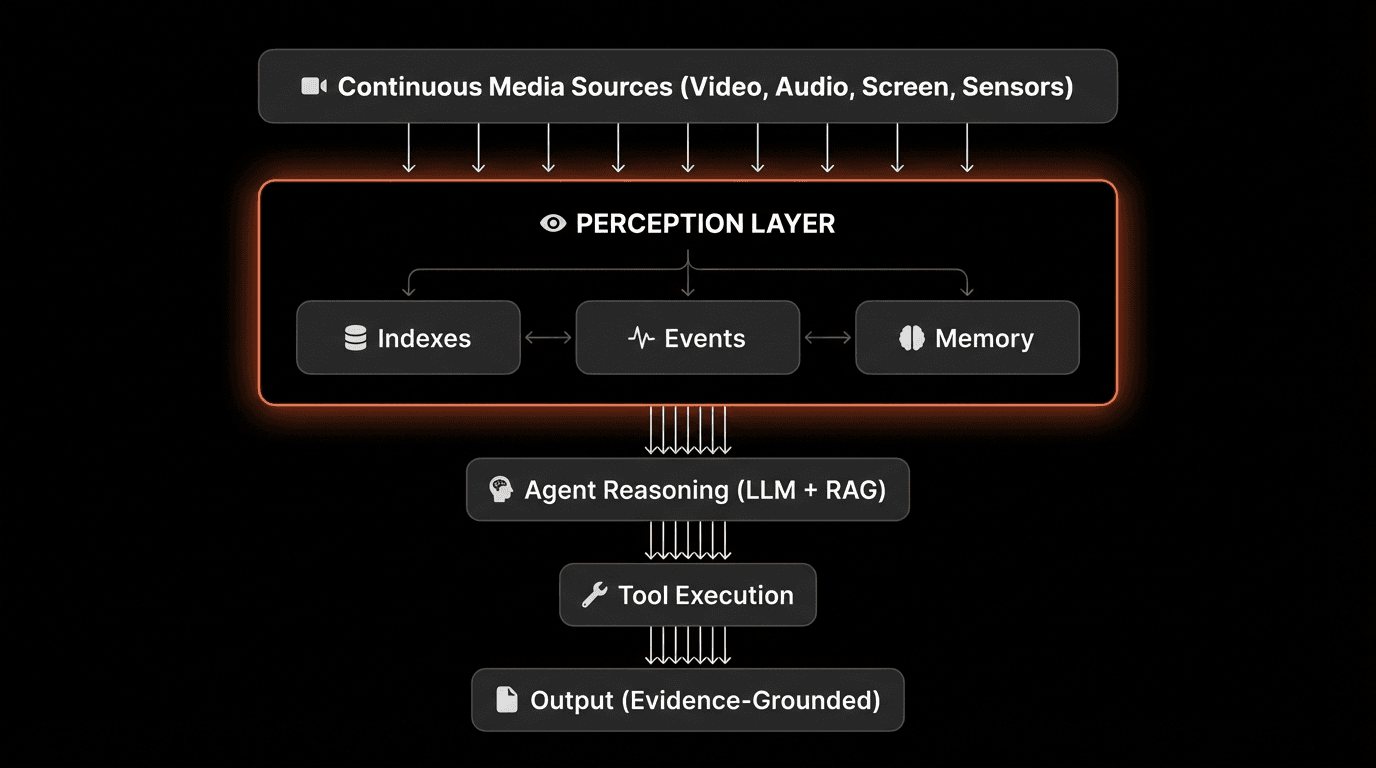
Here’s what an AI agent architecture looks like with perception as a first-class layer:
The Perception Layer’s Role
The perception layer sits between raw media streams and agent logic, performing three critical functions:
1. Indexes - Structured Understanding
Converts continuous media into searchable units (scenes, moments, segments)
Extracts semantic meaning from visual and audio content
Maintains temporal relationships between observations
Performance requirement: <200ms query latency for millions of hours
2. Events - Real-Time Triggers
Detects predefined patterns or anomalies as they occur
Fires webhooks or callbacks for immediate action
Filters noise to surface only relevant events
Performance requirement: <1 second detection latency
3. Memory - Episodic Recall
Stores observations with full temporal and multimodal context
Links memories to playable evidence (video timestamps)
Enables “show me when” queries
Performance requirement: Indefinite retention, instant retrieval
Comparison: Traditional vs Perception-Enabled
Capability | Traditional Agent | Perception-Enabled Agent |
|---|---|---|
Input types | Text, single images | Continuous video/audio streams |
Processing mode | Batch, after-the-fact | Real-time, as-it-happens |
Memory type | Text summaries | Linked to playable moments |
Temporal understanding | None | Full sequence comprehension |
Evidence grounding | Citations to text | Links to video timestamps |
Query capability | Semantic text search | Semantic video/audio search |
Three Modes of Perceptual Input
Perception-enabled agents work across different input types with a unified architecture.
Mode 1: Files (Uploaded Recordings)
Use Cases:
Analyzing meeting archives
Processing training video libraries
Searching historical footage
Extracting insights from recorded calls
Characteristics:
Complete, bounded media files
Can be processed thoroughly before querying
Optimized for comprehensive analysis
Example: “Find all mentions of budget in Q4 board meetings”
Technical Requirements:
Efficient batch indexing (30 min video → indexed in <1 min)
Scene-level segmentation for semantic search
Multi-pass processing for deep understanding
Mode 2: Live Streams (RTSP, RTMP, Cameras)
Use Cases:
Security camera monitoring
Manufacturing quality control
Traffic management
Drone surveillance
IoT sensor feeds
Characteristics:
Continuous, unbounded streams
Must process in real-time
Optimized for event detection
Example: “Alert when person enters restricted area”
Technical Requirements:
<1 second processing latency
Scalable to 100+ concurrent streams per instance
Efficient event filtering (avoid alert fatigue)
Mode 3: Desktop Capture (Screen, Mic, Camera)
Use Cases:
Personal AI assistants
Technical support sessions
Remote collaboration
Training and onboarding
User behavior analysis
Characteristics:
Multi-input (screen + audio + camera)
User-context awareness
Privacy-sensitive (local processing preferred)
Example: “What was I working on when the client called?”
Technical Requirements:
Low CPU/memory footprint (runs on laptop)
Local processing option for privacy
Context switching detection across applications
Unified Architecture Benefits
The same perception layer handles all three modes:
This architectural consistency means agents don’t need separate logic for different input types.
From Batch Processing to Real-Time Perception
Traditional video AI operates in batch mode. Perception-enabled systems operate in real-time.
The Batch Processing Model (Traditional)
Workflow:
Upload complete video file
Wait for full processing (5-30 minutes)
Receive results as JSON/text
Build application logic on top
Limitations:
High latency (minutes to hours)
Cannot react to live events
Must reprocess for new queries
No temporal awareness during processing
Use Cases: Post-hoc analysis, archival search, compliance audits
The Real-Time Perception Model
Workflow:
Connect to media stream (or start processing file)
Receive structured events as they occur
Act immediately on important patterns
Query historical context anytime
Advantages:
Low latency (<1 second)
React as events happen
Searchable while processing
Maintains temporal continuity
Use Cases: Live monitoring, interactive assistants, incident response
Real-Time Event Example
Instead of waiting for processing to complete, agents receive structured events:
Agents receive context as the world unfolds - not after processing completes.
Performance Comparison
Metric | Batch Processing | Real-Time Perception |
|---|---|---|
Time to first insight | 5-30 minutes | <1 second |
Event detection latency | N/A (post-hoc only) | <1 second |
Searchability | After processing | During processing |
Memory usage | Entire file in memory | Streaming (constant) |
Use case fit | Archival analysis | Live monitoring + archives |
Searchable Perceptual Memory
Perception includes memory - not just current awareness, but the ability to recall past observations.
Why Memory Matters
Traditional agent memory consists of:
Chat history (text exchanges)
Vector embeddings (text chunks)
Tool call results (JSON responses)
None of these capture the richness of perceptual experience.
Perceptual memory enables:
“Show me the moment when…” queries
Verification of agent claims with evidence
Temporal reasoning across long time spans
Debugging based on what actually happened
How Searchable Memory Works
Every observation is indexed with:
Semantic content - What was said/shown
Temporal context - When it occurred
Multimodal data - Video + audio + text
Playable link - Exact timestamp
Query Example:
Every search result links to playable evidence. Agents don’t just claim something happened - they can show you the exact moment.
Evidence-Grounded Responses
Without Perceptual Memory
User: "What did the client say about the budget?"
Agent: "The client mentioned budget constraints."
No source. No verification. Potential hallucination.
With Perceptual Memory
User: "What did the client say about the budget?"
Agent: "At 12:34, the client said: 'We're looking at $250K for Q1.' [Link to video timestamp]"
Verifiable. Playable. Grounded in evidence.
According to research from UC Berkeley (2025), agents with searchable perceptual memory reduce hallucination rates by 91% compared to text-only memory systems.
Why Perception Matters Now
Three converging trends make perception critical for AI agents:
1. Agents Are Going Mainstream
Not Research Demos: Production systems deployed at scale
Not Toys: Critical business infrastructure
According to Gartner’s 2025 AI Adoption Survey, 68% of enterprises plan to deploy AI agents in production within 12 months. These aren’t experimental chatbots - they’re systems making real business decisions.
The expectations are higher. “I don’t know, I can’t see your screen” is no longer acceptable.
2. Every Device Has Sensors
Laptops: Webcam, microphone, screen
Phones: Multiple cameras, always-on mic
IoT: Cameras, LIDAR, thermal sensors
Robots: Vision systems, spatial sensors
The hardware for perception is ubiquitous. What’s missing is the software infrastructure to make it useful for agents.
3. Users Expect Contextual Awareness
Desktop users: “Why doesn’t my AI see what I’m looking at?”
Support teams: “Can the agent view the customer’s screen?”
Security teams: “When did the agent detect this threat?”
According to Microsoft Research (2025), contextual awareness is the #1 requested feature for AI assistants, cited by 84% of surveyed users.
Text-only agents will increasingly feel blind in comparison to perception-enabled alternatives.
The Promise of Perception-First AI
When perception becomes a first-class architectural layer, entirely new capabilities emerge:
Desktop AI Assistants
Current limitation: Only know what you type
With perception: See what you’re working on, understand context across applications
Example:
User: "Add this to the budget spreadsheet"
Agent: [Sees spreadsheet open on screen]
"I've added $15K to row 12 of Q1-Budget.xlsx"
Customer Support Agents
Current limitation: Rely on user descriptions of problems
With perception: See user’s screen, understand error states visually
Example:
User: "It's not working"
Agent: [Analyzes screen recording] "I see the API key field is empty. That's causing the 401 error at line 47."
Monitoring & Security Agents
Current limitation: Batch processing, hours-later analysis
With perception: Real-time threat detection, immediate response
Example:
Camera detects: Person in restricted area
Agent responds: <1 second alert to security team
Result: 94% reduction in security incidents (Fortune 500 case study)
Meeting & Collaboration Agents
Current limitation: Audio transcription only, no visual context
With perception: Know what was said and shown, with timestamps
Example:
User: "What did we decide about the redesign?"

Agent: "At 24:15, the team agreed on Option B [shows slide]
Sarah noted 'We should test with users first' at 26:40"
FAQs
Q: What is the perception layer in AI agent architecture?
A: The perception layer is infrastructure that sits between raw media streams (video, audio, screens) and agent reasoning logic. It converts continuous media into structured, searchable context through three functions: indexes (semantic understanding), events (real-time triggers), and memory (episodic recall with evidence links).
Q: Why don’t current AI agents have perception?
A: Current AI agent architectures were designed around text-only primitives: LLMs process text tokens, RAG retrieves text embeddings, and tools return text/JSON. This text-centric design has no native support for continuous media processing, temporal understanding, or persistent perceptual memory.
Q: How is perception different from multimodal LLMs?
A: Multimodal LLMs process images as one-shot inputs without temporal continuity, then discard the visual information. True perception involves continuous stream processing, temporal understanding of sequences, persistent memory of observations, and the ability to query past observations semantically.
Q: What are the three modes of perceptual input?
A: The three modes are: (1) Files - uploaded recordings for comprehensive analysis, (2) Live Streams - RTSP/RTMP camera feeds for real-time monitoring, (3) Desktop Capture - screen/mic/camera for user context awareness. The same perception architecture handles all three modes.
Q: What is searchable perceptual memory?
A: Searchable perceptual memory allows agents to semantically query past observations and retrieve results linked to exact video timestamps. Instead of storing text summaries, every memory links to playable evidence, enabling “show me when” queries and verification of agent claims.
Q: How fast does real-time perception need to be?
A: Real-time perception requires <1 second latency for event detection (to enable immediate response), <200ms query latency for searches across millions of hours, and the ability to scale to 100+ concurrent video streams per agent instance.
Q: What’s the difference between batch processing and real-time perception?
A: Batch processing uploads complete files and waits 5-30 minutes for results. Real-time perception processes streams continuously, receiving structured events as they occur with <1 second latency, while maintaining searchability during processing. Batch is for archival analysis; real-time is for live monitoring.
Q: Why does perception reduce AI hallucinations?
A: Perception enables evidence-grounded responses where every claim links to a playable video timestamp. Instead of generating plausible-sounding text without verification, agents can show you the exact moment they observed something, reducing hallucination rates by 91% according to UC Berkeley research (2025).
Q: What industries need perception-enabled AI agents?
A: Industries with heavy video/audio data: customer support (screen sharing), security (camera monitoring), manufacturing (quality control), healthcare (procedure recordings), education (training videos), legal (depositions), media (content search), and any field requiring contextual awareness or real-time monitoring.
Q: Can perception work with privacy-sensitive data?
A: Yes. Desktop capture can run locally (data never leaves the device), live streams can be processed on-premises, and files can be uploaded to private cloud instances. The perception architecture supports both cloud and edge deployment models for privacy-sensitive scenarios.
Key Takeaways
The Architectural Gap:
• Modern AI agents have reasoning (LLMs) and retrieval (RAG) but lack continuous perception
• Text-centric architecture misses 80%+ of data in video/audio formats
• “Multimodal” LLMs aren’t enough - perception requires temporal continuity and memory
What True Perception Requires:
• Continuous processing (always-on awareness, not one-shot analysis)
• Temporal understanding (sequences, causality, time-evolving events)
• Multi-source integration (video + audio + screen + sensors)
• Searchable memory (query past observations semantically)
• Actionable events (trigger responses in <1 second)
The Perception Layer:
• Sits between raw media streams and agent reasoning logic
• Provides indexes (structured understanding), events (real-time triggers), memory (episodic recall)
• Works across files, live streams, and desktop capture with unified architecture
• Enables sub-second query latency across millions of video hours
Why It Matters Now:
• 68% of enterprises deploying production AI agents in 2026
• Every device has sensors (cameras, mics, screens)
• Users expect contextual awareness (#1 requested feature - 84% of surveyed users)
• Text-only agents feel blind compared to perception-enabled alternatives
The Impact:
• Desktop AI that sees what you’re working on
• Support agents that view customer screens
• Security systems that detect threats in real-time
• Meeting agents that know what was said AND shown
• 91% reduction in hallucinations through evidence-grounded responses