Indexes turn audio visual data into agent ready maps
Indexes turn audio visual data into agent ready maps
Build indexes on video files or real time streams. Get scene level context as it is produced, and store it as memory to search later.
Build indexes on video files or real time streams. Get scene level context as it is produced, and store it as memory to search later.
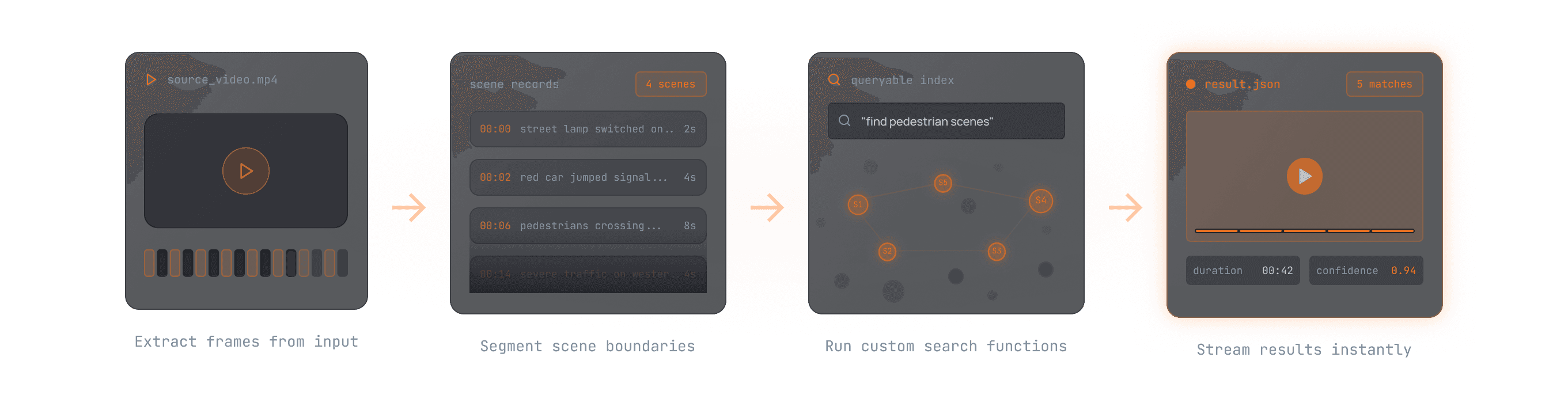
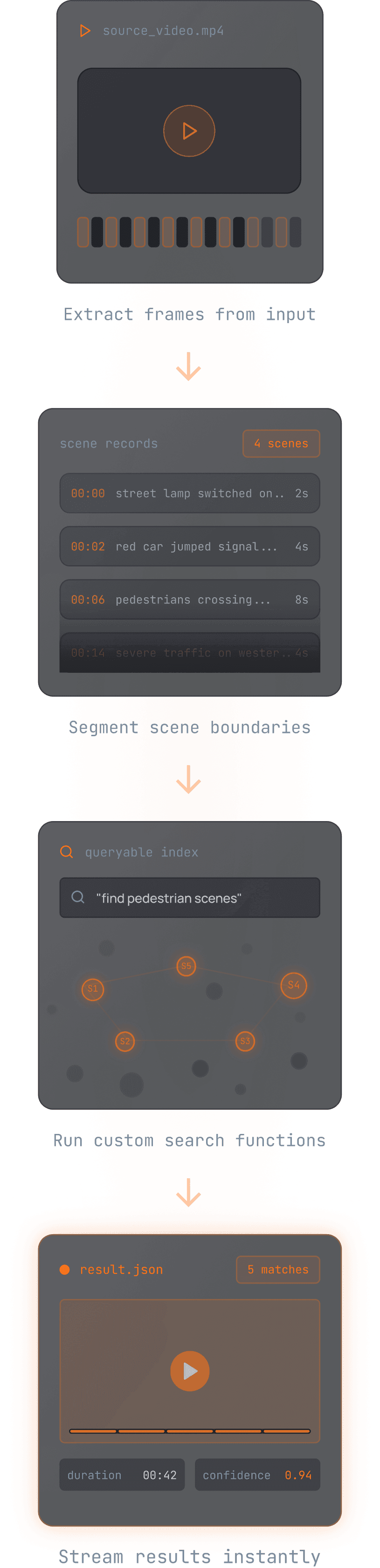

An Index is a programmable interpretation layer
An Index is a programmable interpretation layer
An index is a programmable interpretation layer
An index is produced by combining scene extraction, frame sampling, and prompt-driven understanding. This results in timestamped scene records you can query, filter, and replay as clips.
An index is produced by combining scene extraction, frame sampling, and prompt-driven understanding. This results in timestamped scene records you can query, filter, and replay as clips.
Picks the window
Picks the window
Select frames
Select frames
Define what to extract
Define what to extract
Scene Extraction
Scene Extraction
Frame Sampling
Frame Sampling
Model + Prompt
Model + Prompt
Scene Records
Scene Records
Visual
Speech
Timestamp
Description
Embeddings
Metadata
Works on Files and Live Streams
Works on Files and Live Streams
Works on Files and Live Streams
Same API mental model, different clock sources
Same API mental model, different clock sources
Index files and archives
Index files and archives
files_indexing.py
from videodb import SceneExtractionType
video = coll.upload(url="...")
index_id = video.index_scenes(
    extraction_type=SceneExtractionType.time_based,
    extraction_config={"time": 10, "select_frames": ["first"]},
    prompt="Describe the scene in one short paragraph.",
    callback_url=callback_url,
)
# Index spoken content
video.index_spoken_content(prompt="Summarize key dialogue")
Index streams in real time
Index streams in real time
live_indexing.py
rtstream = coll.connect_rtstream(
    name="Mumbai CCTV",
    url="rtsp://user:pass@1.1.1.1:554/mystream"
)
scene_index = rtstream.index_scenes(
    extraction_type=SceneExtractionType.time_based,
    extraction_config={"time": 2, "frame_count": 1},
    prompt="Describe the scene and highlight congestion",
    name="traffic_monitor",
    ws_connection_id=ws.connection_id,

# Index spoken content
rtstream.index_spoken_words(prompt="Detect speaker intent")
Run multiple indexes on the same source
Run multiple indexes on the same source
Run multiple indexes on the same source
Run multiple specialized indexes on a single source—operations monitoring, compliance checking, and speech analysis—each with its own sampling rate and prompt.
Run multiple specialized indexes on a single source—operations monitoring, compliance checking, and speech analysis—each with its own sampling rate and prompt.
traffic_monitor
Sampling
time: 10s, frame_count: 1
Prompt
Detect traffic density and flow patterns
traffic_monitor
Sampling
time: 10s, frame_count: 1
Prompt
Detect traffic density and flow patterns
compliance_check
Sampling
time: 5s, select_frames: ['first', 'last']
Prompt
Flag safety violations and PPE compliance
compliance_check
Sampling
time: 5s, select_frames: ['first', 'last']
Prompt
Flag safety violations and PPE compliance
spoken_content
Sampling
time: 1s, audio: true
Prompt
Transcribe and summarize spoken dialogue and audio cues
spoken_content
Sampling
time: 1s, audio: true
Prompt
Transcribe and summarize spoken dialogue and audio cues
Filter with scene metadata
Filter with scene metadata
Filter with scene metadata
Scene level metadata acts as smart tags so search does not have to scan every scene.
Scene level metadata acts as smart tags so search does not have to scan every scene.
metadata.py
scene.metadata = {
  "camera_view": "road_ahead",
  "action_type": "chasing"
}
SEARCH FUNNEL
SEARCH FUNNEL
All scenes
Scene 1
Scene 2
Scene 3
Scene 4
Scene 5
Scene 6
Filter by metadata
Scene 2
Scene 5
Semantic ranking
Scene 2
0.87
Scene 5
0.75
Real time now, searchable later
Real time now, searchable later
Real time now, searchable later
For streams, you can paginate scenes as they are created. You can also keep the index for historical querying and replay as "episodic memory."
For streams, you can paginate scenes as they are created. You can also keep the index for historical querying and replay as "episodic memory."
Live context
streaming
Event Detected
Event Detected
Event Detected
Event Detected
Event Detected
persistence layer
Stored index
episodic memory
historical start
query & replay
Live context
streaming
Event Detected
Event Detected
Event Detected
Event Detected
Event Detected
persistence layer
Stored index
episodic memory
historical start
query & replay
Indexes are the base layer for Search and Events
Indexes are the base layer for Search and Events
FAQs
FAQs
FAQs
What exactly is an Index in VideoDB?
An index is the scene level output of running an extraction strategy plus sampling plus prompt driven understanding. It converts continuous media into timestamped scene records you can query and replay.
Can I run indexing on both files and live streams?
How do I control compute cost?
Can I create multiple indexes on the same source? Why would I?
What exactly is an Index in VideoDB?
Can I run indexing on both files and live streams?
How do I control compute cost?
Can I create multiple indexes on the same source? Why would I?

The Perception Layer for AI
Apt 2111 Lansing Street San Francisco, CA 94105 USA
HD-239, WeWork Prestige Atlanta, 80 Feet Main Road, Koramangala I Block, Bengaluru, Karnataka, 560034
sales@videodb.com
AUTOMATION




The Perception Layer for AI
Apt 2111 Lansing Street San Francisco, CA 94105 USA
HD-239, WeWork Prestige Atlanta, 80 Feet Main Road, Koramangala I Block, Bengaluru, Karnataka, 560034
sales@videodb.com
AUTOMATION
The Perception Layer for AI
Apt 2111 Lansing Street San Francisco, CA 94105 USA
HD-239, WeWork Prestige Atlanta, 80 Feet Main Road, Koramangala I Block, Bengaluru, Karnataka, 560034
sales@videodb.com