Capture Desktop Perception
In Real Time
Capture Desktop Perception In Real Time
Stream screen, mic, camera, and system audio with native SDKs. Get live context events and transcripts for assistance. Recording and replay are opt in.
Stream screen, mic, camera, and system audio with native SDKs. Get live context events and transcripts for assistance. Recording and replay are opt in.
Inputs
Screen
Mic
Camera
System Audio
Multiple displays
Capture Client
Native SDK
Context
Event
Streams
No FFmpeg. No GStreamer.
Native Mac, Windows, Linux.
Inputs
Screen
Mic
Camera
System Audio
Multiple displays
Capture Client
Native SDK
Context
Event
Streams
No FFmpeg. No GStreamer.
Native Mac, Windows, Linux.

Install & Authenticate
Install & Authenticate
Install & Authenticate
Ship capture as a separate component, authenticate with session tokens
Ship capture as a separate component, authenticate with session tokens
Skill Install
Python
Node
npx skills add video-db/skills
Skill Install
Python
Node
npx skills add video-db/skills
Skill Install
Python
Node
npx skills add video-db/skills
Skill Install
Python
Node
npx skills add video-db/skills
Separate install so you can bundle it
into your customer app
Separate install so you can bundle it into your customer app
Session token auth, no API keys on
clients
Session token auth, no API keys on clients
Designed for user facing apps with
explicit consent
Designed for user facing apps with explicit consent
Permissions & Channel Discovery
Permissions & Channel Discovery
Permissions & Channel Discovery
Discover channels safely, then choose what to stream
Discover channels safely, then choose what to stream
Request permissions
python
await client.request_permission("microphone")
await client.request_permission("screen_capture")
Discover channels
python
channels = await client.channels()
PERMISSION
ENABLES
microphone
Access to mic audio sources
screen_capture
Access to display video sources and system audio
CHANNELS
Mics
Default mic
Displays
Primary display
Display 2
System audio
Default output
Quickstart Capture & Live Events
Quickstart Capture & Live Events
Quickstart Capture & Live Events
Python
import asyncio
from videodb.capture import CaptureClient

async def main():
    client_token = "<CLIENT_TOKEN_FROM_BACKEND>"
    capture_session_id = "<CAPTURE_SESSION_ID_FROM_BACKEND>"
    client = CaptureClient(client_token=client_token)

    await client.start_capture_session(
        capture_session_id=capture_session_id,
        channels=selected,
        primary_video_channel_id=display.name if display else None,
    )

    async for ev in client.events():
    event_type = ev["event"]
    payload = ev["data"]

    print(f"{event_type}: {payload}")

    if event_type in ("recording-complete", "error"):
        break

    await client.stop_capture()
    await client.shutdown()

asyncio.run(main())
Event Stream
transcript
visual_state
status
recording-complete
error
High-Level Architecture
High-Level Architecture
High-Level Architecture
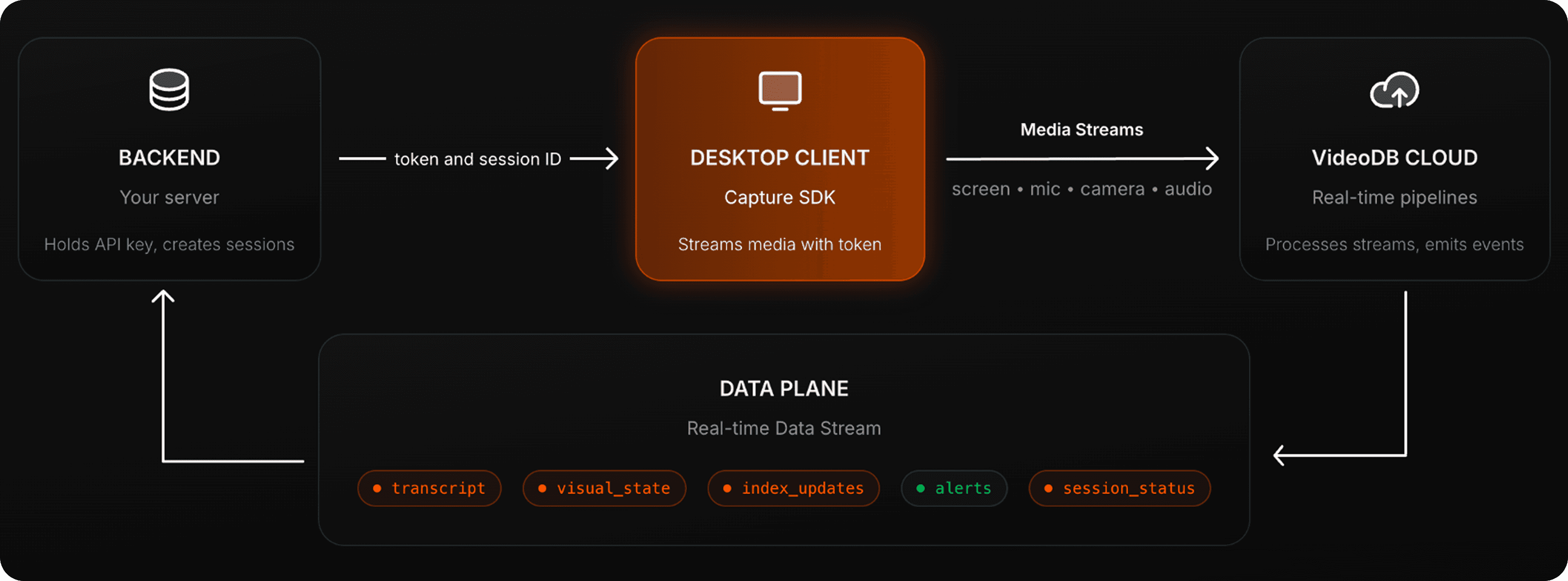
Client captures media. Backend owns indexing policy. VideoDB Cloud runs real time pipelines and returns context, events, and optional memory.
Client captures media. Backend owns indexing policy. VideoDB Cloud runs real time pipelines and returns context, events, and optional memory.
BACKEND
Your server
Holds API key, creates sessions
token and session ID
DESKTOP CLIENT
Capture SDK
Streams media with token
Media Streams
screen
•
mic
•
camera
•
audio
VideoDB CLOUD
Real-time pipelines
Processes streams, emits events
DATA PLANE
Real-time Data Stream
transcript
visual_state
index_updates
alerts
session_status
BACKEND
Your server
Holds API key, creates sessions
token and session ID
DESKTOP CLIENT
Capture SDK
Streams media with token
Streams
screen
•
mic
•
camera
•
audio
VideoDB CLOUD
Real-time pipelines
Processes streams, emits events
DATA PLANE
Real-time Data Stream
transcript
visual_state
index_updates
alerts
session_status
Control, Cost & Opt-In Memory
Control, Cost & Opt-In Memory
Control, Cost & Opt-In Memory
Client captures media. Backend owns indexing policy. VideoDB Cloud runs real time pipelines and returns context, events, and optional memory.
Client captures media. Backend owns indexing policy. VideoDB Cloud runs real time pipelines and returns context, events, and optional memory.
Adaptive streaming
Adaptive streaming
Tune compute by adjusting sampling and stream policy while keeping the agent loop responsive.
Tune compute by adjusting sampling and stream policy while keeping the agent loop responsive.
Opt-in recording for replay
Opt-in recording for replay
Store only when the user explicitly enables it. End of session can
become a native video object.
Store only when the user explicitly enables it. End of session can
become a native video object.
Semantic search when stored
Semantic search when stored
Index and search any moment later, with playable windows and metadata.
Index and search any moment later, with playable windows and metadata.
Pause and resume per channel
Pause and resume per channel
Stop streaming mic or a display without affecting other channels.
Stop streaming mic or a display without affecting other channels.
Build With Capture SDK
Build With Capture SDK
Build With Capture SDK
Desktop Screen and Mic Aware Agents:
Build agents that understand what users see on their screens
Monitor OpenClaw Agents:
Monitor in realtime and set alerts on your open claw agents
Live Sales Copilot
Agent that record sales calls with real-time transcription, visual context and AI-powered insights
Productivity Tracker
AI-powered desktop app that records your screen, understands what you're doing, and gives you actionable productivity insights
Need private VPC deployment?
Need private VPC deployment?
Enterprise-grade security for your organization
FAQs
FAQs
FAQs
What is the Capture SDK?
Capture SDK is a native client library that captures desktop screen, mic, camera, and system audio and streams it to VideoDB in real time. The point is to turn a user session into live context, events, and optional replay, not just a recording file.
How is this different from a screen recorder?
What is the recommended architecture?
Why does the client use a token instead of an API key?
What is the Capture SDK?
How is this different from a screen recorder?
What is the recommended architecture?
Why does the client use a token instead of an API key?

The Perception Layer for AI
Apt 2111 Lansing Street San Francisco, CA 94105 USA
HD-239, WeWork Prestige Atlanta, 80 Feet Main Road, Koramangala I Block, Bengaluru, Karnataka, 560034
sales@videodb.com
AUTOMATION




The Perception Layer for AI
Apt 2111 Lansing Street San Francisco, CA 94105 USA
HD-239, WeWork Prestige Atlanta, 80 Feet Main Road, Koramangala I Block, Bengaluru, Karnataka, 560034
sales@videodb.com
The Perception Layer for AI
Apt 2111 Lansing Street San Francisco, CA 94105 USA
HD-239, WeWork Prestige Atlanta, 80 Feet Main Road, Koramangala I Block, Bengaluru, Karnataka, 560034
sales@videodb.com
AUTOMATION