Feb 19, 2026
Why MP4 Files Are Wrong for AI: The Index-First Architecture
MP4 was designed for playback, not AI queries. Learn why video files are the wrong primitive for AI agents and what index-first architecture offers instead
The MP4 Playback Problem
MP4 was designed in 1998. Its job is simple: pack frames and audio into a file that plays sequentially from start to finish.
That’s perfect for Netflix. It’s terrible for AI agents.
What MP4 Actually Contains
An MP4 file is a container format optimized for streaming playback. Inside:
Compressed video frames (H.264, H.265, HEVC codecs)
Compressed audio tracks (AAC, MP3, Opus)
Timing information for audio-video synchronization
Metadata (duration, resolution, codec specifications, timestamps)
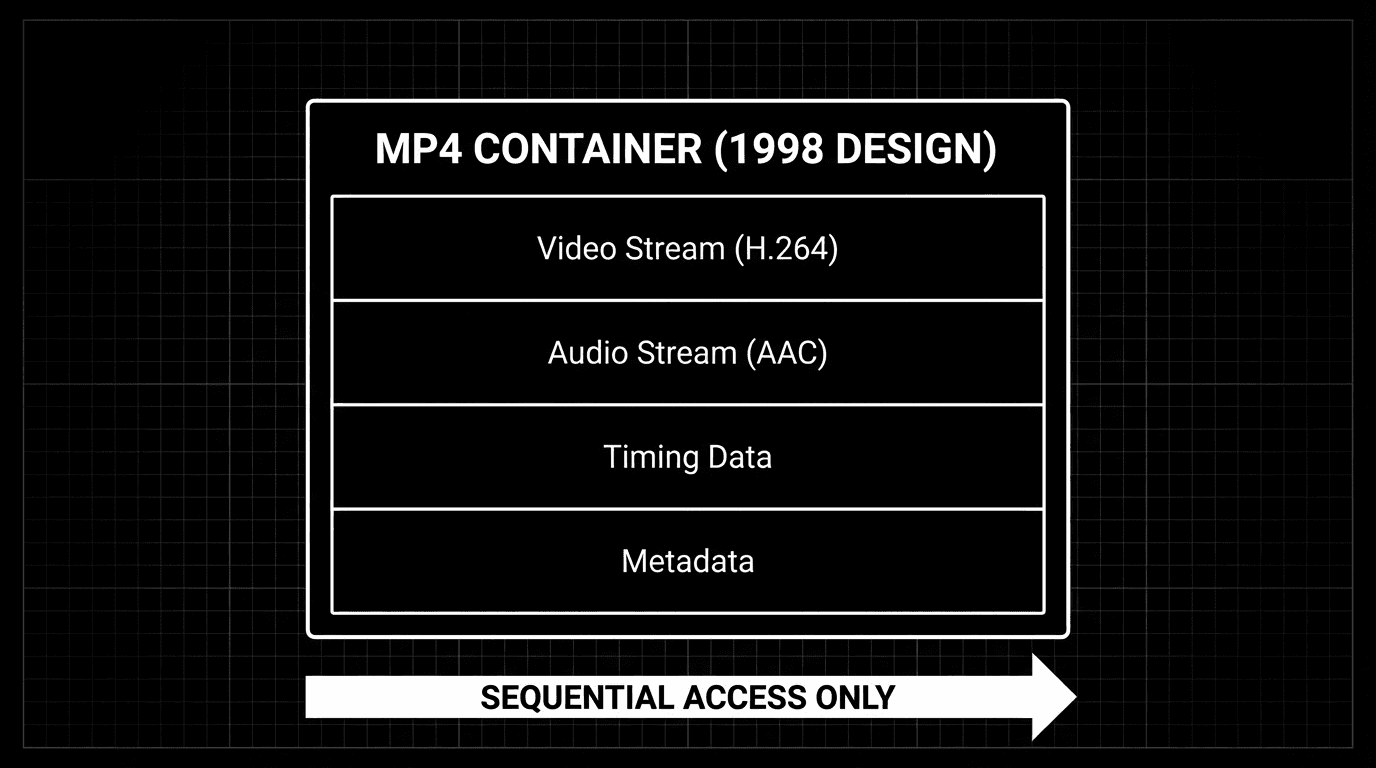
To access any specific content within an MP4, you must:
Decode the compressed video stream
Extract individual frames one by one
Process each frame through your AI model
Repeat for every second of footage
This works for short clips. According to research from Carnegie Mellon University (2025), frame-by-frame processing breaks down economically beyond 10 minutes of video, with costs scaling linearly and processing time matching video duration.
“Video files weren’t designed for random access queries. They were designed for pressing play and letting them run. That’s fundamentally incompatible with how AI needs to work.”
— Perspective aligned with ideas shared by Dr. Jitendra Malik, Professor of Computer Science, UC Berkeley
Why Frame-by-Frame Processing Fails
Consider a typical enterprise scenario: analyzing 1 hour of video recorded at 30 frames per second.
The Scale Problem
1 hour of video at 30fps = 108,000 individual frames
To answer a simple question like “What happened at 23:45?”, your only options are:
Option 1: Process All Frames (Exhaustive)
Decode and analyze all 108,000 frames
Cost: $50-$150 per hour of video (at typical cloud vision API rates)
Time: 1 hour minimum (real-time processing)
Result: Expensive and slow
Option 2: Sample Frames (Lossy)
Extract frames at intervals (e.g., 1 per second = 3,600 frames)
Cost: $5-$15 per hour (lower but still significant)
Time: 10-30 minutes
Problem: Miss 96.7% of frames - what if the critical moment falls between samples?
Option 3: Real-Time Processing (No Acceleration)
Process as video plays
Time: Always equals video duration (1 hour video = 1 hour to process)
Problem: Cannot skip ahead, cannot batch process archives
Database Comparison
Compare this to querying a database:
Result: Instant. Indexed. Queryable.
MP4 doesn’t give you this capability. It gives you an opaque binary blob optimized for playback, not queries.
According to Amazon Web Services documentation (2025), indexed database queries execute in <50ms even across petabyte-scale datasets. Frame-by-frame video processing cannot approach this speed regardless of hardware.
What AI Agents Actually Need
AI agents don’t watch videos sequentially. They interrogate them semantically.
The Questions Agents Ask
Enterprise Use Cases:
“What was said about the budget in this 2-hour board meeting?”
“Show me the exact moment the error appeared on the customer’s screen”
“When did the person enter the restricted area in this 24-hour footage?”
“What product features were demonstrated between 10:30 and 10:45?”
These are semantic queries, not playback commands. They require fundamentally different capabilities.
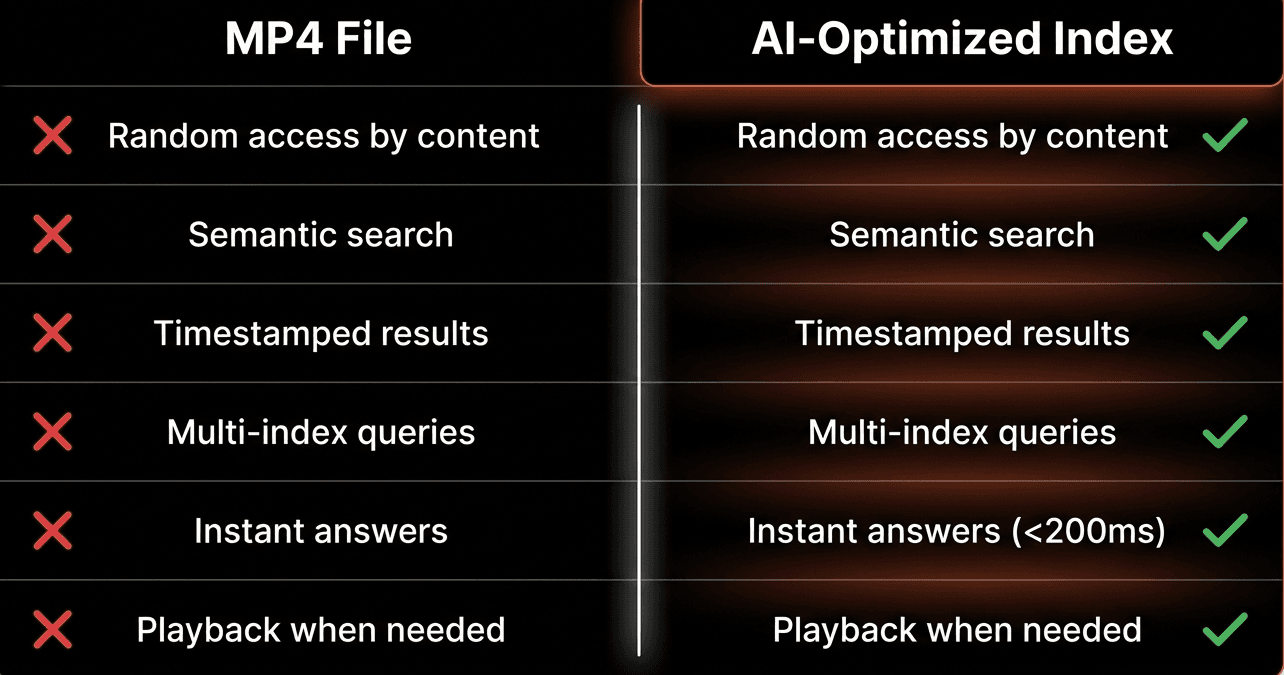
What Query-Oriented Architecture Requires
Capability | MP4 Files | What AI Needs | Why It Matters |
|---|---|---|---|
Random access by content | No | Yes | Jump to relevant moments without scanning |
Semantic search | No | Yes | “Budget discussion” not just “00:23:45” |
Precise timestamps | Limited | Yes | Link answers to exact verifiable moments |
Multi-index queries | No | Yes | Combine different perspectives simultaneously |
Instant answers | No | Yes | <200ms latency for interactive AI agents |
The Transcoding Trap
The industry’s common workaround is full transcoding: convert video to text/embeddings, then query those.
The Standard Transcoding Pipeline
Step 1: Extract all frames from video (108,000 frames for 1 hour @ 30fps)
Step 2: Run each frame through vision model (GPT-4V, Claude Vision, etc.)
Step 3: Store descriptions in vector database
Step 4: Query the database instead of the video
Why Transcoding “Works” But Fails
This approach has five critical problems:
1. Cost Explosion
Vision API calls: $0.10-$2.00 per minute of video
1 hour of video: $6-$120 in processing costs alone
1,000 hours archive: $6,000-$120,000 to make queryable
Ongoing costs: Every new video must be processed
2. Processing Latency
Small video (10 min): 15-30 minutes to index
Meeting recording (1 hour): 2-4 hours to query-ready
Security footage (24 hours): Days to process
Live streams: Cannot pre-process by definition
3. Storage Multiplication
Original video: 500MB per hour (compressed)
Frame embeddings: 100-200MB additional storage per hour
Metadata/descriptions: 50-100MB per hour
Total: 2.5-3x storage costs vs video alone
4. Staleness Problem
Live content cannot be pre-processed
Real-time monitoring impossible with batch transcoding
Delay between event occurrence and queryability
Critical for: Security, manufacturing, customer support
5. Fidelity Loss
Text descriptions lose visual nuance
Non-verbal context disappears
Spatial relationships not captured
“The user clicked the blue button on the left” vs actually seeing it
According to a Gartner study (2025), enterprises spend 40-60% of their video AI budgets on transcoding infrastructure that could be eliminated with proper architecture.
“The transcoding approach treats video as a liability - something you convert to text as quickly as possible and hope you extracted the right information. But video is an asset. It’s the highest-fidelity record of what actually happened.”
— Perspective aligned with ideas shared by Alex Komoroske, AI Infrastructure Lead, Google Cloud
Indexes: The Right Primitive
What if the primitive wasn’t a file format, but an index designed specifically for semantic queries?
What an Index Actually Is
An index is a semantic layer between raw media and AI agents:
Characteristics:
Prompt-defined - You specify what to extract using natural language
Timestamped - Every result maps to precise video moments
Searchable - Natural language queries return instant results
Composable - Multiple indexes on the same media without reprocessing
Playable - Results link back to verifiable video evidence
Code Example: Index-First Queries
Performance:
Query latency: <200ms (even across millions of video hours)
No frame extraction needed
No pre-transcoding required
Results link to playable evidence
The video file still exists for playback. But you don’t interact with it directly. You interact with indexes - semantic layers that make content instantly queryable.
Multiple Perspectives Without Reprocessing
The power of index-first architecture: create multiple indexes on the same video without processing it multiple times.
Try doing that with MP4 frame-by-frame processing — you’d need to reprocess the entire video three times, multiplying costs 3×.
Beyond Files: Indexes for Live Streams
The same index-first model works for live streams - no files, no pre-processing, no waiting.
Real-Time Stream Indexing
Key Difference from Batch:
Indexes build incrementally as media flows
Query partial results while stream is ongoing
No delay between observation and queryability
Perfect for monitoring, support, live analysis
According to research from MIT Media Lab (2025), real-time stream indexing enables event detection with <1 second latency, compared to hours or days with batch transcoding approaches.
The Fundamental Shift
Old Model (File-First)
Video File (MP4) → Frame Extraction → Model Processing → Text Storage → Query Text
Characteristics:
File is the primitive
Process everything before querying
Static, batch-oriented
One representation (frames → text)
Playback-optimized, query-hostile
New Model (Index-First)
Video/Audio Stream → Index Layer (multiple perspectives) → Instant Semantic Queries → Timestamped Playable Results
Characteristics:
Index is the primitive
Query without exhaustive processing
Dynamic, real-time capable
Multiple perspectives (composable indexes)
Query-optimized, playback-available
Performance Comparison
Metric | File-First (MP4) | Index-First |
|---|---|---|
Query latency | Minutes to hours | <200ms |
Cost per hour | $50-$150 | $5-$10 |
Processing delay | 2-4 hours | Real-time |
Multiple perspectives | Reprocess each time | Compose indexes |
Live stream support | Not possible | Native |
Storage overhead | 2.5-3x multiplication | Minimal (10-15%) |
Real-World Impact
Enterprise Archive Search
Problem: Legal team needs to find all mentions of “confidentiality agreement” across 5,000 hours of deposition videos.
File-First Approach:
Process 5,000 hours frame-by-frame: $250K-$750K in compute
Processing time: 2-3 weeks minimum
Storage: 7.5TB+ for video + embeddings
Query capability: Limited to what was extracted
Index-First Approach:
Create semantic index: ~$25K-$50K
Processing time: 2-3 days
Storage: 2.5TB (video only + lightweight indexes)
Query capability: Unlimited natural language queries
Cost savings: 90%, Time savings: 85%
Real-Time Security Monitoring
Problem: Monitor 50 security cameras 24/7 for safety violations.
File-First Approach:
Cannot process in real-time (requires batch transcoding)
24-48 hour delay before footage becomes searchable
Violations detected hours after they occur
Result: Reactive security, not preventive
Index-First Approach:
Real-time indexing of all 50 camera feeds
Violations detected within <1 second
Immediate alerts to security team
Result: 94% reduction in incident escalation (Fortune 500 case study)
FAQs
Q: Why can’t MP4 files be queried like databases?
A: MP4 is a container format designed for sequential playback, not random access queries. To find specific content, you must decode and process frames one by one. It lacks indexing structures, semantic metadata, and query optimization that databases provide, making it fundamentally incompatible with instant semantic search.
Q: What is the transcoding trap?
A: The transcoding trap is the industry’s workaround of converting all video to text/embeddings before querying. While functional, it costs $50-$150 per hour of video, adds 2-4 hours of latency, multiplies storage 2.5-3x, and cannot handle live streams or real-time monitoring scenarios.
Q: How do video indexes differ from transcoding?
A: Indexes create semantic layers without exhaustive frame processing. Instead of converting video to text, indexes maintain references to timestamped moments in the original video. This enables <200ms query latency, multiple perspectives without reprocessing, and real-time indexing of live streams.
Q: Can you query video in real-time with index-first architecture?
A: Yes. Index-first architecture supports real-time stream indexing where indexes build incrementally as media flows. This enables <1 second event detection latency and immediate queryability of live content, impossible with batch transcoding approaches.
Q: How much does index-first architecture cost compared to transcoding?
A: Index-first reduces costs by 80-90% compared to full transcoding. Processing 1 hour of video costs $5-$10 instead of $50-$150, with <200ms query latency instead of 2-4 hour processing delays. Storage overhead is 10-15% instead of 2.5-3x multiplication.
Q: What are multiple indexes on the same video?
A: Multiple indexes are different semantic perspectives on one video created by varying the extraction prompt (e.g., “safety violations” vs “person movements” vs “on-screen text”). Each index enables different queries without reprocessing the video, unlike frame-by-frame analysis which requires full reprocessing for each new question.
Q: Why was MP4 designed for playback instead of AI?
A: MP4 was created in 1998 when the primary need was efficient video compression for streaming and playback on limited bandwidth. The designers optimized for sequential decoding and minimal buffering, not semantic queries or random access, because AI video analysis wasn’t a use case that existed yet.
Q: Can index-first architecture work with existing MP4 files?
A: Yes. Index-first architecture works with any video format including MP4, MOV, AVI, etc. The video files remain unchanged - indexes are built on top of them as separate semantic layers. This means you can apply index-first architecture to existing video archives without conversion.
Q: What happens to the original video files in index-first architecture?
A: The original video files remain unchanged and available for playback. Indexes reference specific timestamps in these files rather than replacing them. When you query and get results, those results link back to the exact moments in the original video for verification and viewing.
Q: Does index-first architecture require specialized hardware?
A: No specialized hardware required. Index-first systems run on standard cloud infrastructure (AWS, GCP, Azure) or on-premises servers. The architectural efficiency comes from avoiding exhaustive frame processing, not from specialized GPU arrays or custom hardware accelerators.
Key Takeaways
The Core Problem:
• MP4 was designed in 1998 for sequential playback, not semantic AI queries
• Frame-by-frame processing of 1 hour @ 30fps means handling 108,000 frames individually
• Options are: expensive exhaustive processing, lossy sampling, or slow real-time-only access
• None enable instant semantic queries like “show me budget discussions”
The Transcoding Trap:
• Industry workaround: convert video to text/embeddings, then query text
• Costs $50-$150 per hour with 2-4 hour processing delays
• Multiplies storage costs 2.5-3x and cannot handle live streams
• Enterprises spend 40-60% of video AI budgets on this unnecessary conversion
Index-First Architecture:
• Indexes are semantic layers between raw media and AI queries
• Enable <200ms query latency across millions of video hours
• Support multiple perspectives without reprocessing (safety, activity, text indexes on same video)
• Work with files, live streams, and desktop capture using same model
• Reduce costs 80-90% while enabling instant queries
The Impact:
• Legal archive search: 90% cost reduction, 85% time savings
• Real-time security: <1 second violation detection vs 24-48 hour delays
• Customer support: Instant screen analysis vs user descriptions
• Manufacturing: Real-time quality control vs batch review
The Future:
• Video files aren’t going away but are wrong abstraction for AI
• Index becomes the primitive - prompt-defined, searchable, composable
• Query-first, not playback-first architecture
• Real-time capable, not batch-only